Whether you’re planning a product launch, trade show booth, or corporate event, a well-executed VR arcade setup transforms passive attendees into engaged participants. This guide covers everything from equipment selection to operational logistics for deploying multi-station VR experiences at temporary venues.
VR Arcade Configurations for Business Events
Unlike permanent VR arcades that require dedicated real estate and fixed installations, event-based VR arcade setups prioritize portability, rapid deployment, and flexible station counts. This section covers the three primary configuration models businesses use for trade shows, corporate events, and brand activations.
Free-Roam Arena Systems
Free-roam VR represents the premium tier of event experiences, allowing multiple users to walk freely through virtual spaces while seeing each other as avatars. These systems demand the most space but deliver unmatched engagement.
Space Requirements: A 4-player free-roam experience requires a minimum of 400 square feet of unobstructed floor space. For 6-8 players, plan for 600-800 square feet. The space must be completely clear of obstacles, with additional buffer zones of 3 feet around the perimeter for safety.
Hardware Configurations: You’ll choose between backpack PCs and wireless headsets. Backpack systems like the HP VR Backpack G2 offer unlimited play time and high-end graphics but add 10 pounds of weight per user. Wireless headsets like the Meta Quest 3 eliminate weight concerns but require battery swaps every 2-3 hours during continuous operation.
Safety Infrastructure: Professional free-roam setups include modular padding systems for walls and columns. Foam barriers should extend 4 feet high minimum, with high-visibility marking tape defining the play boundary. Install overhead cable management systems if using backpack PCs to prevent tripping hazards.
Typical Rental Packages: Most vendors offer 4-player and 8-player configurations. A 4-player system rents for $3,000-5,000 per day, including setup and an operator. The 8-player configuration runs $5,000-8,000 daily, requiring a dedicated 30×30 foot space minimum.
Seated Station Arrays
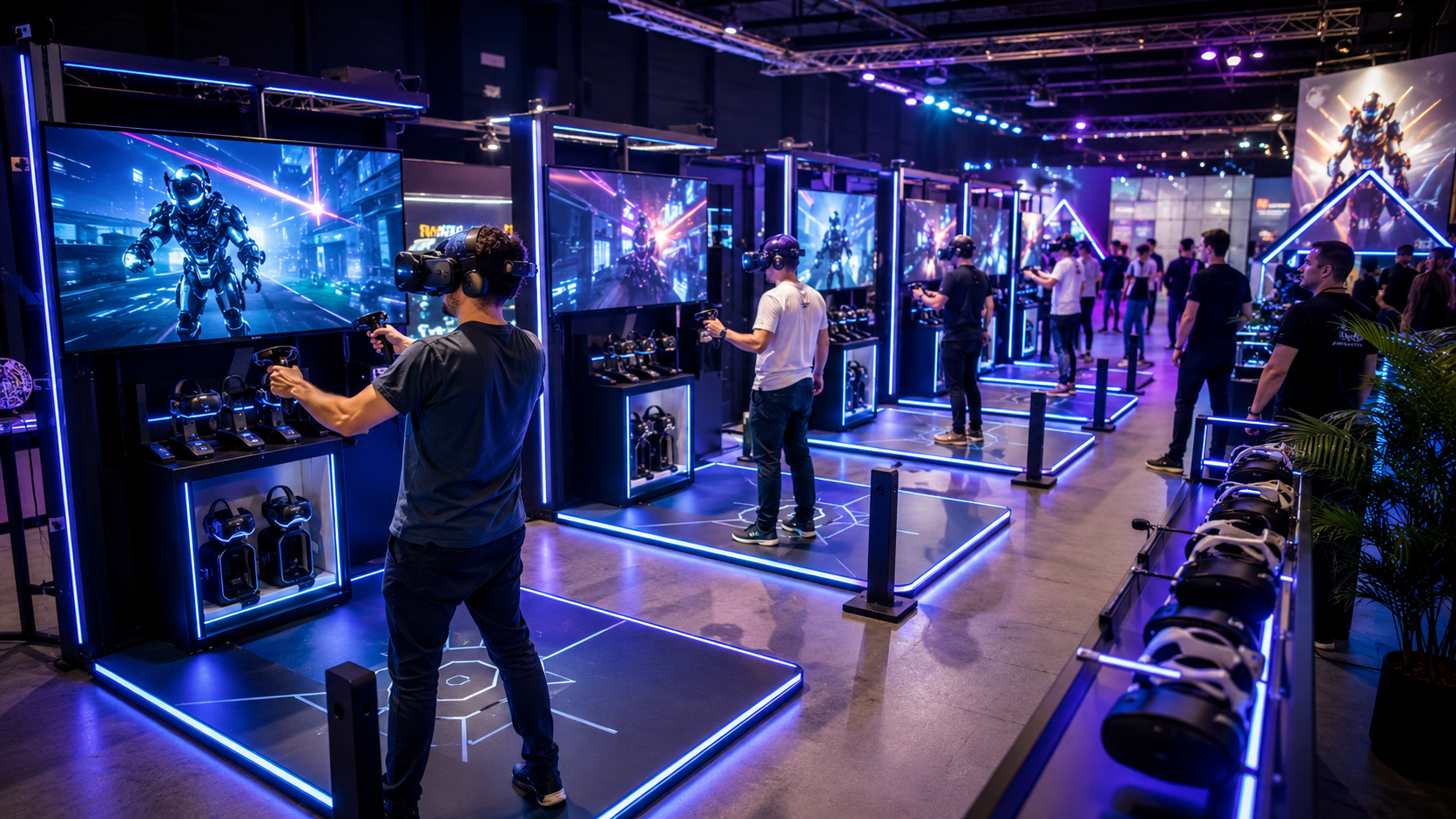
Seated configurations maximize throughput in limited booth space while minimizing motion sickness concerns. This setup works exceptionally well for racing simulations, flight experiences, and seated adventure games.
Footprint Optimization: A standard 10×10 trade show booth accommodates 4 seated VR stations comfortably, or 6 stations with careful planning. Each station requires a 4×4 foot operational zone, including the chair’s rotation radius and safety buffer.
Seating Solutions: Swivel chairs with locking casters provide stability while allowing 360-degree rotation for immersive experiences. Standing platforms with hip-height support rails offer an alternative for shorter experiences, increasing throughput by eliminating sit-down time between users.
Cable Management: Tethered headsets require overhead cable booms or retractable ceiling mounts. Budget $200-300 per station for professional cable management hardware. Run cables through spiral wrap and secure them to prevent tangling during chair rotation.
Throughput Metrics: Seated stations average 8-12 users per hour, assuming 5-minute experiences with 2-minute changeovers. Factor in longer changeovers during peak times when queues create pressure to rush sanitization protocols.
Hybrid Zones with Mixed Experiences
Combining different VR experiences in one activation creates diverse engagement opportunities while managing queue distribution across station types.
Zone Design: Separate high-energy experiences like racing simulators from quieter, story-driven VR stations. Use 6-foot dividers or pipe-and-drape systems to create distinct zones within larger event spaces. Position spectator screens at zone boundaries to draw attendees deeper into the experience area.
Audio Management: Racing simulators and action games generate significant noise. Position these stations away from presentation areas or neighboring booths. Provide noise-canceling headphones for quieter experiences, or implement zone-specific sound systems with directional speakers.
Unified Operations: Deploy a single check-in desk managing all experiences through a shared reservation system. Use color-coded wristbands to indicate which experience each guest has reserved. Maintain a 1:4 staff-to-station ratio for hybrid setups, with floaters who can assist across different experience types.
Hardware Selection for Multi-Station Deployments
Choosing between standalone wireless headsets and PC-tethered systems impacts your setup time, content options, and operational complexity. This section breaks down the hardware decisions that determine whether your VR arcade setup takes 2 hours or 2 days to deploy.
Standalone Headset Arrays
Standalone headsets have revolutionized event VR deployments by eliminating gaming PCs and complex tracking systems.
Enterprise Headset Options: The Meta Quest 3 ($649 retail) and PICO 4 Enterprise ($899) lead the standalone category. Both offer inside-out tracking, hand tracking capabilities, and 2-3 hour battery life. The PICO 4 Enterprise includes device management software and commercial licensing, while Meta requires Quest for Business subscriptions at $14.99 monthly per device.
Fleet Management: ArborXR and ManageXR provide centralized control for headset fleets. These platforms enable remote app installation, device monitoring, and kiosk mode enforcement. Budget $10-20 per headset monthly for management platform access. Pre-load all content before events to avoid bandwidth bottlenecks.
Charging Infrastructure: Maintain a 2:1 ratio of headsets to active stations for continuous operation. Use multi-device charging cases that accommodate 8-10 headsets simultaneously. The KIWI design 10-port charging station ($299) handles Quest 3 headsets efficiently. Position charging stations near the operator desk for easy battery swaps.
Network Configuration: Multiplayer experiences require robust WiFi infrastructure. Deploy a dedicated WiFi 6 access point per 8 headsets, maintaining -67 dBm or stronger signal strength at all play positions. Use 5GHz bands exclusively to minimize interference from attendee devices.
PC-Powered Station Requirements
PC-based systems enable premium graphics and access to the full SteamVR library but require significant infrastructure investment.
GPU Specifications: Each station needs an RTX 4070 or better for reliable 90Hz performance at high resolutions. The RTX 4070 Ti provides headroom for demanding titles like Half-Life: Alyx or Microsoft Flight Simulator. Avoid older generation cards; the performance gap isn’t worth the minimal cost savings.
System Configurations: Rack-mounted PCs save floor space and simplify cable management. A 42U mobile rack accommodates 8 gaming PCs plus network equipment. Tower PCs offer easier maintenance access but require secure positioning to prevent kicks or spills. Budget $2,500-3,500 per complete PC station including the headset.
Power Distribution: Each VR-ready PC draws 400-600 watts under load. Plan for 20-amp circuits per 3 stations, including monitors and accessories. Deploy uninterruptible power supplies (UPS) for each station to prevent data loss during power fluctuations. Use PDUs with individual outlet switching for remote power cycling.
Redundancy Planning: Maintain 20% spare capacity across all components. For an 8-station setup, have 2 backup PCs ready for hot-swapping. Keep spare headsets, cables, and controllers on-site. Pre-configure all backup hardware with identical software loads for rapid replacement.
Tracking and Boundary Systems
Modern tracking systems eliminate the external sensors that complicated early VR deployments, but each approach offers distinct advantages.
Inside-Out Tracking: Current generation headsets use onboard cameras for position tracking, eliminating setup complexity. This technology works in most lighting conditions but struggles with reflective surfaces or completely featureless walls. Apply removable vinyl markers to blank walls when necessary.
Lighthouse Systems: SteamVR Lighthouse 2.0 base stations provide sub-millimeter tracking precision for competitive gaming or training applications. Each base station covers 200 square feet; most setups require 2-4 units. Mount base stations 6.5 feet high using heavy-duty clamps or weighted tripods.
Physical Boundaries: Portable interlocking floor mats clearly define play spaces while providing cushioning. The ProxiMat system offers 2×2 foot tiles that connect without tools. For premium setups, LED floor strips create glowing boundaries visible to spectators and enhance the futuristic aesthetic.
Monitoring Systems: Connect each VR station to an external display showing the user’s view. Position these monitors for both staff supervision and spectator engagement. Use HDMI splitters maintaining full resolution rather than compressed streaming solutions that introduce lag.
Content Strategy for VR Arcade Experiences
The content mix determines whether attendees line up for your VR arcade or walk past after one demo. Business events require different content curation than consumer arcades, emphasizing brand-appropriate experiences, short session times, and universal accessibility.
Session Length Optimization
Event environments demand rapid throughput while maintaining experience quality.
Short-Form Experiences: Design your primary content rotation around 3-5 minute experiences. Beat Saber’s party mode, Space Pirate Trainer’s arcade mode, and Superhot VR’s challenge levels fit this window perfectly. These allow 10-15 complete sessions per hour per station.
Premium Extended Sessions: Reserve one or two stations for 8-10 minute premium experiences. Half-Life: Alyx’s opening sequence or The Climb 2’s tutorial peaks provide memorable moments worth the wait. Implement reservation systems for these stations to manage expectations.
Dynamic Scheduling: Adjust session lengths throughout the event day. Run shorter experiences during peak lunch hours and extend sessions during slower morning periods. Use timer displays visible to users and queuing attendees to maintain schedule adherence.
Rapid Onboarding: Every experience needs a sub-60-second tutorial for first-time users. Pre-record briefing videos that play while users put on headsets. Use hand tracking for menu navigation to eliminate controller explanation time.
Multi-User and Competitive Formats
Social experiences drive engagement and create memorable moments that attendees share.
Synchronized Launching: Configure all stations to launch the same multiplayer experience simultaneously. Rec Room’s custom rooms, VRChat private instances, and Walkabout Mini Golf support 8+ concurrent players. Schedule “tournament times” every hour for maximum participation.
Leaderboard Integration: Display real-time scoreboards on large screens visible throughout your event space. Pistol Whip, Synth Riders, and Until You Fall include built-in leaderboard functionality. Award branded prizes to top performers each day.
Team Experiences: Arizona Sunshine, After the Fall, and Pavlov VR support 4-player co-op modes perfect for corporate team building. Create custom team names and track cumulative scores across multiple sessions. These experiences generate organic word-of-mouth as teams recruit colleagues.
Spectator Engagement: Stream multiple VR views to a video wall using OBS Studio or Wirecast. Add commentary for competitive sessions. Position comfortable seating near displays to create a natural gathering point that draws curious attendees.
Custom Brand Experiences
Branded VR content elevates your activation from entertainment to marketing investment.
Content Integration: Work with Unity or Unreal Engine developers to create 5-minute branded experiences. Budget $50,000-150,000 for custom development with 3-month timelines. Alternatively, license existing experiences for branding opportunities at $5,000-25,000 per event.
Product Visualization: Automotive brands use VR for virtual test drives and customization. Real estate developers offer virtual property tours. B2B companies demonstrate complex machinery operation safely. These applications justify premium booth space investments.
Hybrid Experiences: Combine branded content with popular games. Run 3 minutes of product demonstration followed by 2 minutes of Beat Saber with company music. This maintains engagement while delivering marketing messages.
Commercial Licensing: Verify commercial use rights for all content. Consumer game licenses don’t cover business use. SynthesisVR, SpringboardVR, and other commercial platforms provide pre-cleared content libraries with usage tracking for royalty payments.
Operational Logistics and Staffing
A 6-station VR arcade setup requires more than just hardware. This section covers the operational framework that keeps experiences running smoothly, from pre-event testing through breakdown logistics.
Setup and Testing Timeline
Proper setup sequencing prevents day-of disasters and ensures smooth operation from first attendee.
Installation Schedule: Allocate 4-6 hours for a 6-station configuration. Begin with power distribution and network setup (90 minutes), followed by PC/console positioning (60 minutes), headset configuration (90 minutes), and content loading (60 minutes). Reserve the final hour for full system testing.
Network Validation: Test bandwidth with all devices simultaneously streaming or downloading. Verify each station maintains <20ms latency to local servers. Run network speed tests from multiple locations within the play area to identify dead zones.
Content Synchronization: Use batch installation tools to deploy content across all devices simultaneously. Verify version matching for multiplayer experiences. Test cross-platform play if mixing headset types. Create backup images of configured devices before the event.
Staff Training: Conduct a complete dry run with all event staff. Each person should complete at least one experience and practice the guest onboarding process. Review troubleshooting procedures for common issues like tracking loss or controller disconnection.
Staffing Requirements
Adequate staffing ensures safety, maximizes throughput, and maintains equipment.
Attendant Ratios: Maintain 1 attendant per 3 stations for optimal operation. Attendants manage headset fitting, experience selection, and basic troubleshooting. During peak periods, increase to 1:2 ratios to minimize wait times.
Technical Lead: Designate one technical expert who doesn’t operate stations. This person handles complex troubleshooting, manages the network, and coordinates with venue IT staff. They should carry spare parts and tools for rapid repairs.
Hygiene Coordinator: Assign dedicated staff for sanitization protocols. They clean headsets between users, manage disposable face covers, and maintain hand sanitizer stations. This role becomes critical during cold and flu season or at healthcare industry events.
Queue Manager: For activations expecting 50+ users per hour, employ a dedicated queue coordinator. They manage the reservation system, distribute wristbands, and communicate wait times. This person also identifies VIP guests requiring expedited access.
Health and Safety Protocols
Professional safety standards protect guests and limit liability exposure.
Sanitization Procedures: Use UV-C sanitization boxes for controllers between users. Apply 70% isopropyl alcohol wipes to headset surfaces, avoiding lenses. Provide disposable VR face covers ($0.50 each) or washable silicone interfaces. Schedule deep cleaning every 2 hours during continuous operation.
Motion Sickness Prevention: Screen users for VR experience levels and motion sensitivity. Start first-timers with stationary experiences. Keep ginger candies and water available. Maintain the play area at 68-70°F to reduce nausea risk. Train staff to recognize early distress signs.
Age and Health Screening: Post clear age restrictions (typically 13+ for most content). Require waivers for users under 18. Screen for epilepsy, pregnancy, and balance disorders. Maintain ADA-compliant alternatives like seated experiences for users with mobility limitations.
Insurance Coverage: Verify your general liability policy covers VR operations. Most require additional riders for “amusement devices” at $500-1,500 per event. Rental companies typically include insurance, but confirm coverage limits meet venue requirements.
Cost Analysis: Rental vs Purchase for Event VR Arcades
The economics of VR arcade setups shift dramatically between one-time activations and recurring event programs. This section provides the financial framework for deciding between rental packages and equipment ownership.
Rental Package Economics
Rental provides turnkey solutions with predictable costs and minimal risk.
Package Pricing: A 6-station VR arcade setup rents for $8,000-15,000 for a 4-day event including setup/breakdown. Daily rates range from $2,000-4,000 depending on hardware tier and included services. Premium packages with custom content or free-roam systems command $20,000+ for major activations.
Included Services: Standard rentals include delivery within 100 miles, setup assistance, and basic operator training. Most packages provide device management software, commercial content licenses, and technical support. Confirm whether operators are included; add $500-800 daily per operator if not.
Content Licensing: Rental agreements typically include commercial use licenses for 20-30 popular titles. Custom or premium content may require additional licensing at $500-2,000 per title per event. Verify whether you can load proprietary content onto rental hardware.
Protection Coverage: Rental contracts include replacement coverage for normal wear. Damage waivers cost an additional 10-15% but cover accidental damage. Read exclusions carefully; intentional damage or theft typically aren’t covered. Document all equipment condition during delivery.
Purchase Considerations for Recurring Events
Ownership makes sense for companies running 4+ events annually or maintaining permanent demo spaces.
ROI Calculations: A 6-station setup costs $15,000-25,000 to purchase outright. Break-even occurs after 4-6 rental-equivalent events. Factor in storage, transportation, and maintenance costs of $500-1,000 monthly when calculating total ownership expense.
Ongoing Expenses: Budget for commercial content licenses ($100-500 per title annually), device management platforms ($20 per headset monthly), and replacement parts (10% of hardware cost annually). Insurance runs $2,000-5,000 yearly for owned equipment.
Technology Refresh: VR hardware evolves rapidly. Plan for major upgrades every 18-24 months to maintain competitive experiences. Headsets depreciate 40-50% annually. Sell previous generation equipment to VR arcades or educational institutions to recoup some investment.
Resale Market: Used enterprise VR equipment retains 30-40% value after 2 years if well-maintained. Complete stations with documentation sell better than individual components. Market to schools, training centers, and smaller event companies.
Hybrid Models
Strategic combinations of rental and ownership optimize costs while maintaining flexibility.
Core Plus Overflow: Own 4 base stations for regular use, rent additional units for large events. This reduces storage requirements while ensuring availability for major activations. Negotiate volume discounts with rental partners for predictable overflow needs.
Seasonal Strategies: Purchase equipment for busy season (typically September-November and March-May for trade shows). Rent during slower periods to avoid storage costs. Some rental companies offer storage programs for owned equipment during off-seasons.
Try-Before-Buy Programs: Several vendors offer rental fees applicable toward purchase within 60-90 days. This allows real-world testing before committing capital. Negotiate purchase option pricing upfront to avoid surprises.
Managed Services: Companies like VRstudios and Phenomena provide managed service agreements for owned equipment. They handle maintenance, updates, and replacement parts for $500-1,500 monthly per station. This bridges the gap between rental convenience and ownership economics.
Venue Requirements and Site Planning
Not every event space can accommodate a VR arcade setup. This section outlines the non-negotiable venue requirements and common workarounds for challenging spaces.
Space and Layout Planning
Physical space constraints determine your maximum configuration and user flow patterns.
Area Calculations: Free-roam stations require 100 square feet minimum per player. Seated stations need 25 square feet including safety buffers. Standing stations operate in 35-40 square feet. Add 30% for queuing areas and operator space.
Ceiling Heights: Maintain 9-foot minimum clearance for standing experiences. Users reaching overhead need 18 inches of safety margin. Taller ceilings (12+ feet) improve tracking performance and allow for overhead cable management systems.
Traffic Flow Design: Create clear entry and exit paths avoiding the play area. Use stanchions and retractable belt barriers to guide traffic. Position the check-in desk where staff can monitor all stations. Locate charging stations and equipment storage behind the operator area.
Emergency Access: Maintain 36-inch minimum corridors to all emergency exits. Ensure users can quickly remove headsets and evacuate. Post evacuation procedures visible to staff. Conduct an evacuation drill during setup to identify bottlenecks.
Power and Network Infrastructure
Inadequate power and networking cause most event VR failures.
Electrical Requirements: Calculate 800 watts per PC-based station, 200 watts per standalone station. An 8-station PC setup needs 100-amp service minimum. Request dedicated circuits separate from lighting or other booth equipment. Verify ground fault protection for user safety.
Network Architecture: Deploy enterprise-grade access points supporting WiFi 6 (802.11ax). Each access point handles 30-40 devices reliably. Use 5GHz bands exclusively for VR traffic. Implement VLANs to isolate VR traffic from attendee devices. Maintain 100Mbps+ internet connectivity for cloud services and updates.
Backup Power: Rent generator backup for outdoor events or venues with questionable power stability. Size generators at 125% of peak load. Use online UPS systems for sensitive equipment. Budget $500-1,500 daily for generator rental including fuel.
Distribution Strategy: Position power distribution units (PDUs) every 15 feet to minimize cable runs. Use 12-gauge extension cords for runs over 25 feet. Label all connections clearly. Tape down all cables crossing walkways with high-visibility gaffer tape.
Environmental Considerations
Environmental factors significantly impact user comfort and system performance.
Temperature Control: VR headsets generate heat, and active users warm up quickly. Maintain 68-70°F ambient temperature. Each station generates 500-1,000 BTU/hour. Supplement venue HVAC with portable units if necessary. Position fans to create airflow without disturbing tracking.
Lighting Management: Eliminate direct sunlight on play areas which interferes with inside-out tracking. Use blackout curtains for windows. Avoid strobe lights or rapidly changing lighting effects. Maintain consistent 200-400 lux illumination for optimal tracking.
Acoustic Treatment: VR experiences average 75-85 dB. Use acoustic panels or pipe-and-drape to contain sound. Position loud experiences away from presentation areas. Provide noise-canceling headphones for adjacent booth staff. Consider time-based rotation of quiet and loud content.
Weather Contingencies: For tent or outdoor venues, secure all equipment against wind. Use weighted base plates for standing structures. Protect equipment from rain with waterproof cases during transport. Cancel operations if winds exceed 25 mph or during electrical storms.
Frequently Asked Questions
How many VR stations can run on a standard 20-amp circuit?
A standard 20-amp circuit (2,400 watts at 80% continuous load) safely powers 2 PC-based VR stations or 6-8 standalone headset stations. Always maintain 20% capacity margin for power spikes.
What’s the minimum space needed for a 4-player VR arcade setup?
Seated configurations require 200 square feet minimum (including operator space). Standing stations need 300 square feet. Free-roam setups demand 400-600 square feet depending on the experience type.
Do VR arcade setups require dedicated internet connections?
Multiplayer experiences and cloud services require 25Mbps per station minimum. Single-player offline content doesn’t require internet. Most events benefit from dedicated connections to avoid competing with attendee devices.
How long does it take to set up a 6-station VR arcade?
Professional teams complete 6-station setups in 4-6 hours. First-time setups take 6-8 hours. Complex free-roam systems or custom content may require day-before installation.
What’s the typical cost to rent a VR arcade setup for a 3-day event?
Basic 6-station rentals range from $6,000-12,000 for 3 days. Premium setups with operators and custom content reach $15,000-25,000. Location, included services, and hardware tier significantly impact pricing.
Can VR arcade setups run outdoors or in tents?
Yes, with proper planning. Ensure stable power, eliminate direct sunlight, and protect equipment from weather. Tent installations work well with climate control and proper flooring. Avoid operations in rain, high winds, or extreme temperatures.
What staff-to-headset ratio is recommended for events?
Maintain 1 staff per 3 headsets for smooth operation. High-traffic events benefit from 1:2 ratios. Add dedicated technical support and hygiene staff for setups exceeding 6 stations.
How do you handle hygiene between users in a VR arcade?
Use UV-C sanitizers or 70% alcohol wipes between users. Provide disposable face covers or washable silicone interfaces. Schedule deep cleaning every 2 hours. Maintain hand sanitizer stations at entry and exit points.
What’s the throughput for a VR arcade station at an event?
Expect 8-12 users per hour for 5-minute experiences with standard changeover. Premium 10-minute experiences accommodate 4-5 users hourly. Factor in longer changeovers during peak periods.
Do rental VR arcade setups include content licenses?
Most rentals include 20-30 commercial-licensed titles. Premium or brand-new content may cost extra. Verify you can load proprietary content. Some rentals restrict content to prevent inappropriate material at corporate events.
Conclusion
Successful VR arcade deployments at events require careful planning across multiple dimensions—from hardware selection and space planning to staffing and safety protocols. Whether you choose rental packages for flexibility or invest in owned equipment for recurring events, the key lies in matching your configuration to your specific audience and objectives.
Start with a clear understanding of your goals: Are you maximizing throughput at a trade show, creating memorable experiences at a corporate event, or showcasing products through virtual demonstrations? Your answer drives every subsequent decision from hardware selection to content curation.
Remember that the most sophisticated VR arcade setup fails without proper operational support. Invest in adequate staffing, comprehensive training, and robust contingency planning. The difference between a memorable brand activation and a frustrating technology demo often comes down to the human elements of your deployment.
As VR technology continues evolving, temporary VR arcade installations will become increasingly streamlined and accessible. Stay informed about new hardware releases, content opportunities, and operational best practices to maintain competitive advantage in your event activations.
Ready to deploy a VR arcade at your next event? Start by requesting quotes from multiple vendors 60-90 days before your event. Compare not just pricing but included services, hardware specifications, and content libraries. Test experiences personally before committing. Most importantly, plan for success by securing adequate space, power, and staffing well in advance. Your attendees and your activation metrics will thank you.