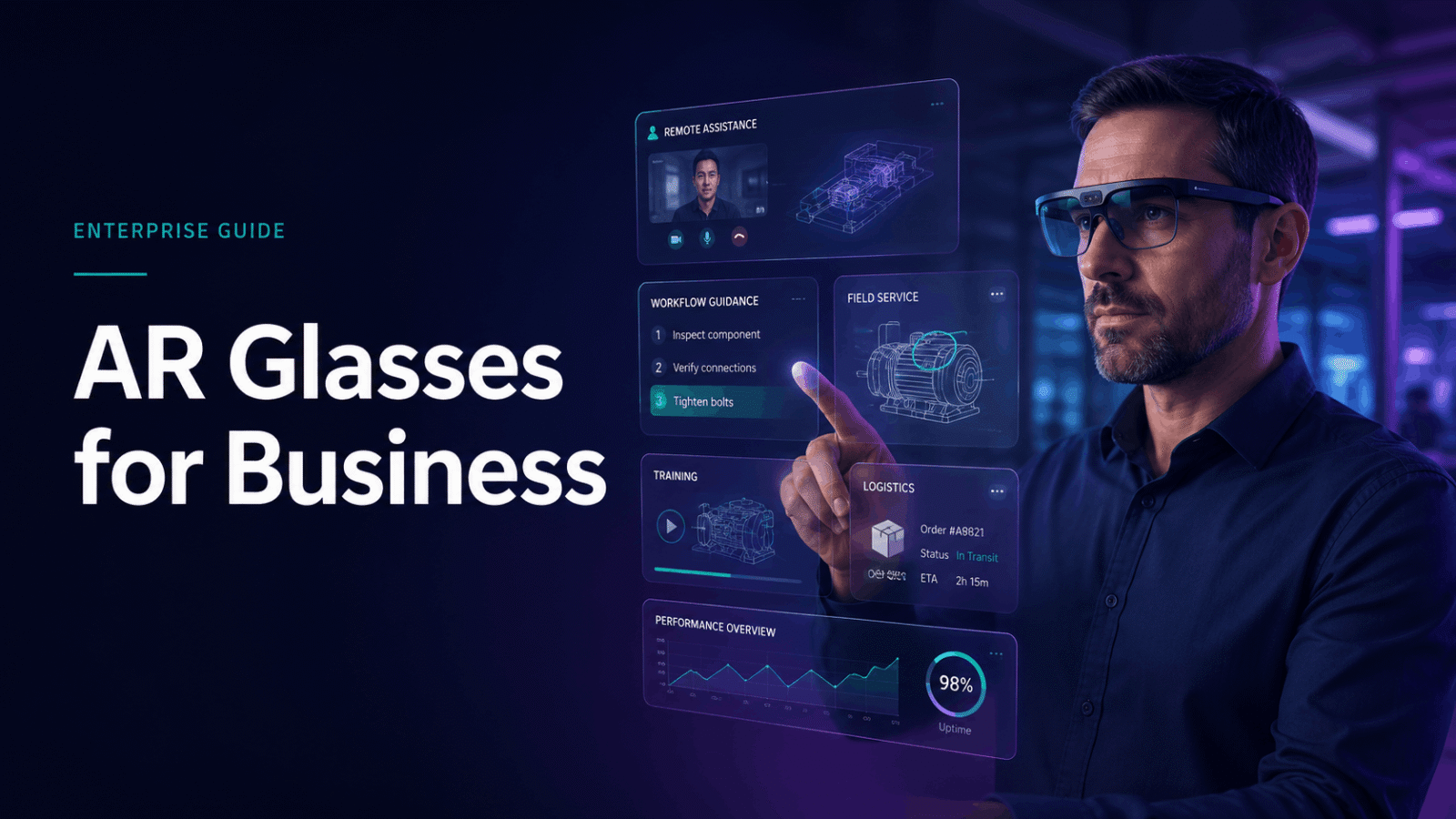
Enterprise augmented reality (AR) glasses are transforming operational workflows across industries, from manufacturing floors to field service calls. This comprehensive guide examines hardware platforms, deployment strategies, and implementation requirements for businesses evaluating AR glasses for operational use cases.
Business Applications Driving AR Glasses Adoption
AR glasses transform how businesses handle remote assistance, field service, warehouse operations, and hands-free workflows. Unlike VR headsets that create fully immersive environments, AR glasses overlay digital information onto the real world, letting workers see instructions, schematics, and remote expert guidance while keeping both hands free for tasks.
The technology addresses critical operational challenges: reducing equipment downtime through faster repairs, minimizing errors in complex assembly processes, and enabling experienced technicians to guide multiple field workers simultaneously. Companies deploying AR glasses report measurable improvements in first-time fix rates, training efficiency, and operational safety.
Remote Assistance and Expert Support
Live video streaming with annotation capabilities enables remote troubleshooting without dispatching specialists to job sites. Field technicians wearing AR glasses share their view with remote experts who draw annotations, highlight components, and guide repairs in real-time. This visual collaboration eliminates miscommunication common with phone-based support.
Expert guidance overlay technology projects step-by-step instructions directly into the technician’s field of view. Complex repairs that previously required on-site specialists now proceed with remote supervision. Manufacturing companies report 50% reduction in mean time to repair (MTTR) when field technicians access remote expert support through AR glasses.
Travel cost reduction represents immediate ROI for organizations with distributed operations. A single expert can support multiple field locations daily, eliminating travel time and expenses. Energy companies deploying AR glasses for offshore platform maintenance save $1,500-3,000 per avoided helicopter trip while resolving issues 40% faster through remote assistance.
Warehouse and Logistics Operations
Pick-and-pack optimization through AR glasses displays optimal routing paths and item locations directly in workers’ vision. Visual picking instructions eliminate the need to reference handheld devices or paper lists, keeping both hands free for material handling. DHL’s warehouse pilots showed 25% productivity improvement with AR-guided picking.
Hands-free barcode scanning integrated into AR glasses eliminates the constant pickup and putdown of traditional scanners. Workers scan items by looking at barcodes, with confirmation displayed in their peripheral vision. This seamless scanning reduces motion waste and prevents repetitive strain injuries from handling scanners thousands of times per shift.
Worker productivity gains of 25-35% in order fulfillment come from eliminating non-value-added activities. AR glasses remove the cognitive load of remembering locations, interpreting pick lists, and confirming quantities. Workers focus entirely on physical tasks while the AR system handles information processing and verification.
Manufacturing and Quality Control
Step-by-step assembly instructions overlaid on workstations guide workers through complex procedures without referencing manuals or screens. Boeing technicians using AR glasses for wire harness assembly reduced production time by 25% and eliminated rework from wiring errors. The visual guidance adapts to each worker’s pace, pausing when they look away and resuming when attention returns.
Real-time quality inspection with AI-powered defect detection flags issues immediately during production. AR glasses highlight anomalies, display tolerance specifications, and guide corrective actions. Automotive manufacturers using AR-assisted inspection report 90% reduction in defects reaching final assembly.
Digital work instructions that update based on production changes eliminate version control issues with paper documentation. When engineering releases design updates, AR glasses automatically display revised procedures. This instant propagation of changes prevents costly errors from outdated instructions while maintaining complete audit trails of which instructions workers followed.
Enterprise AR Glasses Platform Comparison
The business AR glasses market splits into three categories: lightweight viewers for basic information display, mid-range devices with processing power for complex applications, and ruggedized industrial models built for harsh environments. Each platform targets different operational needs and deployment scales.
Platform selection depends on environmental conditions, application requirements, and user comfort for extended wear. Consumer-focused devices lack the durability, battery life, and enterprise software integration required for operational deployments. Business-grade platforms include device management capabilities, security features, and support agreements essential for mission-critical applications.
Microsoft HoloLens 2 for Mixed Reality Applications
Microsoft HoloLens 2 operates as a self-contained Windows holographic computer with advanced hand tracking and spatial mapping capabilities. The device projects 3D holograms that workers manipulate with natural hand gestures, enabling interaction with digital twins and complex visualizations without controllers.
Azure cloud integration provides enterprise-grade data services and AI capabilities. HoloLens 2 connects to Azure Remote Rendering for visualizing massive CAD models, Azure Spatial Anchors for persistent hologram placement, and Dynamics 365 Guides for step-by-step work instructions. This ecosystem integration accelerates application development and deployment.
Battery life of 3-4 hours supports half-shift operation with hot-swap capability for continuous use. The $3,500 purchase price includes commercial licensing, while $125/month rental options enable pilot programs without capital investment. Microsoft offers volume discounts starting at 20 units and provides enterprise support agreements with guaranteed response times.
RealWear Navigator Series for Frontline Workers
RealWear Navigator devices prioritize voice-controlled, hands-free operation in noisy industrial environments. The head-mounted micro-display positions below the eye line, maintaining peripheral vision while displaying information. Voice commands work reliably in 95dB environments, enabling operation while wearing protective equipment.
Intrinsically safe certification for hazardous locations makes RealWear suitable for oil and gas, chemical processing, and mining operations. The devices meet ATEX Zone 1, IECEx, and North American Class 1 Division 1 standards for explosive atmospheres. This certification eliminates the need for hot work permits in classified areas.
Hot-swappable batteries enable continuous operation across shifts without device downtime. The modular design allows field replacement of batteries in seconds. At $2,400 purchase price, RealWear targets high-volume deployments with aggressive pricing for 100+ unit orders. The platform runs Android applications, simplifying integration with existing mobile enterprise software.
Vuzix M400 and Blade for Light Industrial Use
Vuzix smart glasses use Android-based architecture familiar to IT departments, reducing deployment complexity. The see-through waveguide display technology maintains natural vision while projecting information into the user’s view. This optical approach reduces eye strain during extended wear compared to micro-displays.
Lightweight design enables all-day wear in office and light industrial settings without neck fatigue. The Blade model weighs 90 grams, comparable to safety glasses, while the M400 adds ruggedization for warehouse environments. Both models support prescription lens inserts, accommodating workers who require vision correction.
Starting at $1,800 with volume discounts for fleet deployments, Vuzix offers the lowest entry price for business-grade AR glasses. The company provides white-label options for software vendors building vertical solutions. SDK availability and Android compatibility accelerate custom application development for specific use cases.
Rental vs Purchase Economics for AR Glasses Programs
Most businesses start AR glasses deployments with rental pilots before committing to purchases. Rental programs include preloaded software, setup support, and the flexibility to test different hardware platforms without capital investment. The break-even point between renting and buying typically falls between 12-18 months of continuous use.
Financial planning for AR glasses requires considering total cost of ownership beyond hardware prices. Software licensing, training, support, and eventual refresh cycles impact long-term economics. Rental programs shift these costs to predictable operational expenses while providing upgrade flexibility as technology advances.
Pilot Program Structure Through Rentals
30-90 day pilot rentals validate use cases and quantify ROI before larger investments. Short-term rentals cost $400-800 per device monthly, including basic software and support. This timeframe allows organizations to test multiple use cases, gather user feedback, and measure operational improvements.
Preloaded enterprise applications reduce IT setup time from weeks to days. Rental providers configure devices with remote assistance, workflow management, and documentation applications suited to specific industries. This turnkey approach accelerates time to value while IT teams focus on integration rather than installation.
Testing multiple platforms before standardizing prevents costly platform switches later. Organizations can compare HoloLens for complex visualizations, RealWear for voice control, and Vuzix for lightweight wear. Side-by-side evaluation with actual users identifies the best fit for specific operational requirements.
Total Cost of Ownership Calculations
Hardware costs represent 40-60% of total AR glasses investment over three years. Software licensing adds $50-200 per device monthly for enterprise applications. Support contracts, training, and infrastructure upgrades contribute additional costs often overlooked in initial budgets.
Rental rates of $400-600/month compare to $2,500-4,500 purchase prices plus ongoing costs. For deployments under 12 months or pilot programs, rentals provide better economics. Continuous use beyond 18 months favors purchasing, assuming stable technology requirements and user adoption.
Device refresh cycles every 2-3 years maintain performance and compatibility with evolving software. Warranty coverage beyond the first year costs 10-15% of hardware price annually. Factor these recurring costs when comparing rental versus purchase economics for multi-year deployments.
Scaling from Pilot to Production Deployment
Rent-to-own programs apply 50-80% of rental fees toward eventual purchase, reducing risk while preserving investment. These arrangements work well for phased rollouts where initial pilots expand gradually. Organizations maintain flexibility while building credit toward ownership.
Volume pricing tiers at 25+ devices reduce per-unit costs by 15-25%. Manufacturers offer enterprise agreements with predictable pricing for multi-year deployments. These agreements include priority support, advance replacement, and software licensing bundles that simplify procurement.
Managed service options provide ongoing support and device management for $100-250 per device monthly. Service providers handle updates, replacements, and user support, allowing IT teams to focus on integration and optimization. This model works well for organizations lacking dedicated AR support resources.
Implementation Requirements and IT Considerations
Deploying AR glasses at scale requires planning for network infrastructure, device management, security policies, and user training. Unlike consumer devices, enterprise AR glasses need mobile device management (MDM) integration, secure content distribution, and support for existing business applications.
Infrastructure readiness determines deployment success more than device selection. Networks must support streaming video, cloud applications, and multiple simultaneous users. Security policies need updating for head-mounted cameras and microphones. Training programs must address both technical operation and workflow changes.
Network and Connectivity Requirements
WiFi 6 or 5G connectivity enables streaming applications without latency or buffering. AR glasses streaming 1080p video require 5-10 Mbps sustained bandwidth per device. Networks must support this traffic alongside existing operations without degrading performance.
Edge computing options reduce latency for time-sensitive applications like remote surgery or precision assembly. Processing data locally eliminates round-trip delays to cloud servers. Manufacturing facilities deploy edge servers running AI models for real-time quality inspection through AR glasses.
Bandwidth planning for multiple simultaneous users prevents network congestion during shift changes or training sessions. Calculate peak loads when all devices connect simultaneously. Implement quality of service (QoS) policies prioritizing AR traffic for mission-critical applications.
Security and Device Management
MDM integration enables remote configuration, application deployment, and security policy enforcement. AR glasses appear as managed devices in existing MDM consoles, simplifying administration. IT teams control which applications install, what data accesses occur, and how devices authenticate.
Data encryption protects sensitive information captured by AR glasses cameras and transmitted over networks. Implement end-to-end encryption for remote assistance sessions containing proprietary processes or customer data. Store recordings in encrypted formats with access logging for compliance auditing.
Compliance with industry regulations like HIPAA for healthcare or ISO standards for manufacturing requires careful configuration. AR glasses must not record in restricted areas or capture regulated data without proper controls. Implement geofencing to automatically disable cameras in sensitive locations.
Training and Change Management
Phased rollout starting with tech-savvy early adopters builds organizational confidence before broader deployment. Select enthusiastic users who provide constructive feedback and become internal champions. Their success stories motivate hesitant workers and demonstrate practical benefits.
Hands-on training sessions with actual work scenarios accelerate adoption compared to classroom instruction. Workers practice their specific tasks while wearing AR glasses, building muscle memory and confidence. Include troubleshooting common issues like connectivity problems or voice command recognition.
Documentation of best practices and troubleshooting guides reduces support burden as deployments scale. Create video tutorials showing proper wear adjustment, voice command techniques, and application navigation. Maintain FAQ documents addressing common concerns about eye strain, privacy, and job security.
Building Your AR Glasses Business Case
Successful AR glasses deployments start with clear success metrics and measurable outcomes. Focus on specific operational improvements like reduced error rates, faster task completion, or decreased travel costs rather than abstract productivity gains.
Quantifiable benefits resonate with executives evaluating investment decisions. Document baseline metrics before deployment, track improvements during pilots, and project scaled impact. Include both hard savings from reduced costs and soft benefits from improved safety or employee satisfaction.
ROI Metrics and KPI Tracking
First-time fix rates for field service applications typically improve 15-30% with AR glasses providing remote expert support. Track resolution without repeat visits, parts accuracy, and customer satisfaction scores. Calculate savings from avoided truck rolls and reduced warranty claims.
Pick accuracy in warehouse operations reaches 99.9% with AR guidance compared to 97-98% with paper lists. Measure errors per thousand picks, time per order, and training duration for new workers. Convert accuracy improvements to reduced returns and customer satisfaction metrics.
Training time reduction of 40-50% for complex procedures accelerates workforce development. Document time to competency for new employees, retention rates after training, and reduction in training-related errors. Calculate savings from shortened training periods and improved knowledge retention.
Stakeholder Alignment and Budget Approval
Link AR initiatives to existing digital transformation goals for easier approval and funding. Position AR glasses as enabling technology for Industry 4.0, connected worker, or operational excellence programs. Demonstrate alignment with corporate strategies around innovation, safety, or sustainability.
Start with OpEx rental budgets before requesting CapEx for purchases. Operational budgets often have more flexibility for pilot programs than capital budgets requiring board approval. Use pilot results to justify capital investment with proven ROI data.
Document pilot results with video testimonials and quantitative data for compelling presentations. Record before-and-after scenarios showing efficiency improvements. Include testimonials from workers explaining how AR glasses make their jobs easier and safer. Present data in executive dashboards highlighting key metrics and financial impact.
Frequently Asked Questions
What’s the difference between AR glasses and VR headsets for business use?
AR glasses overlay digital information onto the real world while maintaining visual awareness of surroundings, enabling hands-on work with guidance. VR headsets create fully immersive virtual environments suited for training simulations but impractical for operational tasks requiring interaction with physical equipment.
How much do AR glasses cost to rent vs buy for enterprise deployment?
Enterprise AR glasses rent for $400-800 monthly per device including basic software and support. Purchase prices range from $1,800-4,500 depending on capabilities, with additional costs for software licensing ($50-200/month), support contracts, and training.
Which AR glasses platform works best for warehouse operations?
Vuzix M400 and RealWear Navigator excel in warehouse environments. Vuzix offers lightweight all-day comfort for picking operations, while RealWear’s voice control works well in noisy distribution centers. Both integrate with warehouse management systems and support barcode scanning.
Can AR glasses integrate with existing enterprise software systems?
Yes, enterprise AR glasses support REST APIs, SDK integration, and standard protocols for connecting with ERP, CRM, and specialized operational software. Most platforms run Android or Windows applications, enabling custom development or third-party application deployment.
What network infrastructure do AR glasses require?
AR glasses need WiFi 6 or 5G connectivity providing 5-10 Mbps sustained bandwidth per device for streaming applications. Networks must support multiple simultaneous connections with low latency. Edge computing may be required for real-time processing applications.
How long does it take to train workers on AR glasses?
Basic operation training takes 2-4 hours for most workers, with additional application-specific training varying by complexity. Workers typically achieve proficiency within one week of regular use. Younger workers often adapt faster, while experienced workers may need additional support.
Are AR glasses safe for all-day industrial use?
Enterprise AR glasses meet safety standards for extended wear, with certifications for specific hazards like explosive atmospheres. Ergonomic designs minimize neck strain, and optical systems reduce eye fatigue. However, workers should take regular breaks following manufacturer guidelines.
Conclusion
AR glasses for business represent a strategic investment in operational efficiency, workforce enablement, and competitive advantage. Success requires matching platform capabilities to specific use cases, planning infrastructure requirements, and building organizational support through measured pilot programs.
Start your AR glasses journey with a focused pilot targeting a specific operational challenge. Rent devices for 60-90 days to validate ROI before committing to purchases. Document improvements meticulously and expand deployments based on proven results.
Ready to explore AR glasses for your operations? Contact enterprise AR solution providers for pilot program consultation and platform demonstrations tailored to your industry’s specific requirements. The transformation from traditional workflows to augmented operations begins with understanding your unique challenges and mapping them to AR capabilities that deliver measurable business value.