
When someone finds your business on Google Maps, the photos often decide whether they visit, call or keep scrolling. A Google virtual tour lets them step inside first: walk through your lobby, showroom, venue or clinic in 360°, right from your Business Profile. This guide explains how it works in 2026, what it costs, the rules most guides get wrong, and when you need more than Google can offer.
Quick answer: A Google virtual tour for business is a set of connected 360° photos of your location, published to Google Maps and linked to your Google Business Profile. You capture the space with a 360° camera or hire a professional, then publish through Google Maps or a third-party tool. Google charges no fee to publish, and no special certification is needed.
What is a Google virtual tour for business?
It’s an indoor Street View experience for your own location. Visitors click into your listing and move from one 360° photo to the next, as if they were walking through the space.
Google describes it simply: photos and virtual tours “help people decide to visit a business,” and you can publish them “yourself, or with the help of a professional” (Google Street View for business). Google says Maps has more than 1 billion monthly users and lists more than 200 million businesses and places, so that is where many customers form a first impression.
A Google tour is different from a branded virtual tour on your own website. Both start with 360° photography, but they do different jobs. More on that below.
Which businesses benefit most from a Google virtual tour?
Any business people visit in person and want to preview. If customers ask “what does it look like inside?” or “will it work for my group?”, a tour helps answer that before they call.
- Event venues, country clubs and golf courses: planners shortlist spaces before booking a site visit.
- Hotels and resorts: guests compare lobbies, rooms and amenities.
- Restaurants, bars and nightclubs: diners check the vibe and seating for groups or private events.
- Showrooms and retail: shoppers see what’s on the floor before they drive over.
- Clinics, gyms and assisted living: families and members get comfortable with the space.
- Schools and training centers: students and parents preview campuses and classrooms.
Private homes are the main exception. Matterport notes that Google’s terms prohibit publishing residential homes to Street View (Matterport support), so real estate listings need a tour hosted somewhere else.
How do you get a virtual tour on Google Maps?
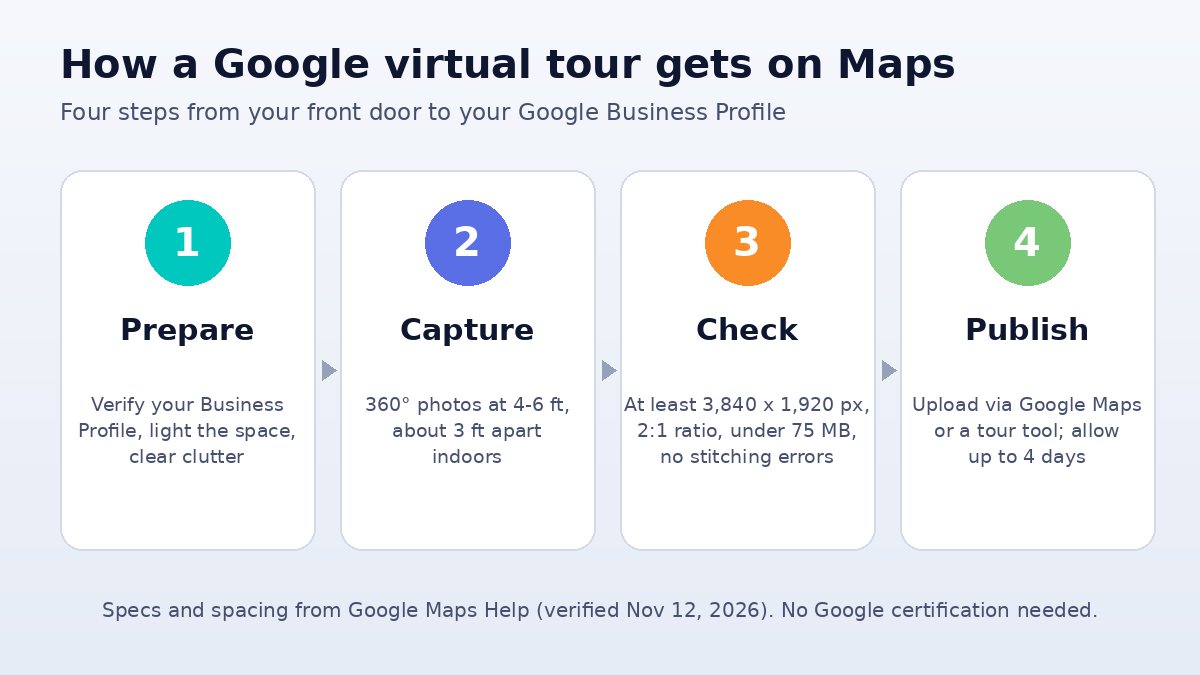
You capture 360° photos of your space, connect them into a walkable path, and publish them to your Google Maps location. Here is the process step by step.
- Verify your Business Profile. Make sure your name, address and category are correct so the tour attaches to the right listing.
- Plan the route. Start outside at the entrance, then move through the main areas people care about. Skip back offices and anything private.
- Prepare the space. Turn on all the lights, open blinds, clear clutter and hide screens or paperwork with customer information.
- Capture the 360° photos. Google recommends a camera height of about 4 to 6 feet and spacing indoor shots about 3 feet (two small steps) apart so the photos connect well (Google Maps Help).
- Check the files. Each Photo Sphere needs to be at least 7.5 MP (3,840 x 1,920 px), in a 2:1 ratio, under 75 MB, sharp and free of stitching errors (Google Maps Help).
- Publish and connect. Upload single Photo Spheres through Google Maps, or use a third-party tool to link them into a tour. Google says to allow up to 4 days for processing.
- Check it on a phone. Open your listing in the Maps app, walk the tour and make sure it starts at your front door.
Do you need a Google Trusted Photographer?
No. Google retired the Street View trusted program on December 31, 2024, along with the trusted badge and the photographer-for-hire list (Google’s notice, via Work Pics 360).
Anyone can still publish tours to Google Maps, and tours made under the old program are still live. But if a vendor still sells itself as “Google Trusted” or “Google certified,” that claim is out of date. Judge providers on their portfolio and reviews instead.
The standalone Google Street View app is gone too. Support ended in March 2023, and Google pointed people to Google Maps for adding Photo Spheres and to Street View Studio for 360° video (9to5Google). Many older how-to guides still tell you to download that app.
How much does a Google virtual tour cost?
Google doesn’t charge to publish or host your tour (Omnitour). What you pay for is the capture: either your own 360° camera and time, or a photographer. Simple Google-only shoots for a small space are often priced in the hundreds of dollars.
| Option | What you pay | Best for |
|---|---|---|
| Do it yourself | A consumer 360° camera plus a few hours of your time | Small shops and offices with simple layouts |
| Google-only photographer | Often a few hundred dollars for a small space; one provider advertises tours starting at $499 (TrueView 360s) | Restaurants, retail and clinics that just want a Maps tour |
| Matterport capture | Your Matterport plan; publishing to Street View is free with any plan (Matterport) | Teams already scanning spaces in Matterport |
| Branded custom tour (IGIVU) | Starter Tour $4,000 (up to 15 spots); Professional Tour $7,000 (up to 25 spots, with headsets and on-site support for events) | Venues, hotels, facilities and brands that need a sales and marketing tool |
For a full price breakdown across tour types, read How Much Does a Virtual Tour Cost in 2026?
What can’t a Google virtual tour do?
A Google tour is built to show reality, not to sell. Google’s photo guidelines say images should have “no significant alterations” and should “represent reality” (Google Business Profile Help), so there is no room for your branding or sales tools.
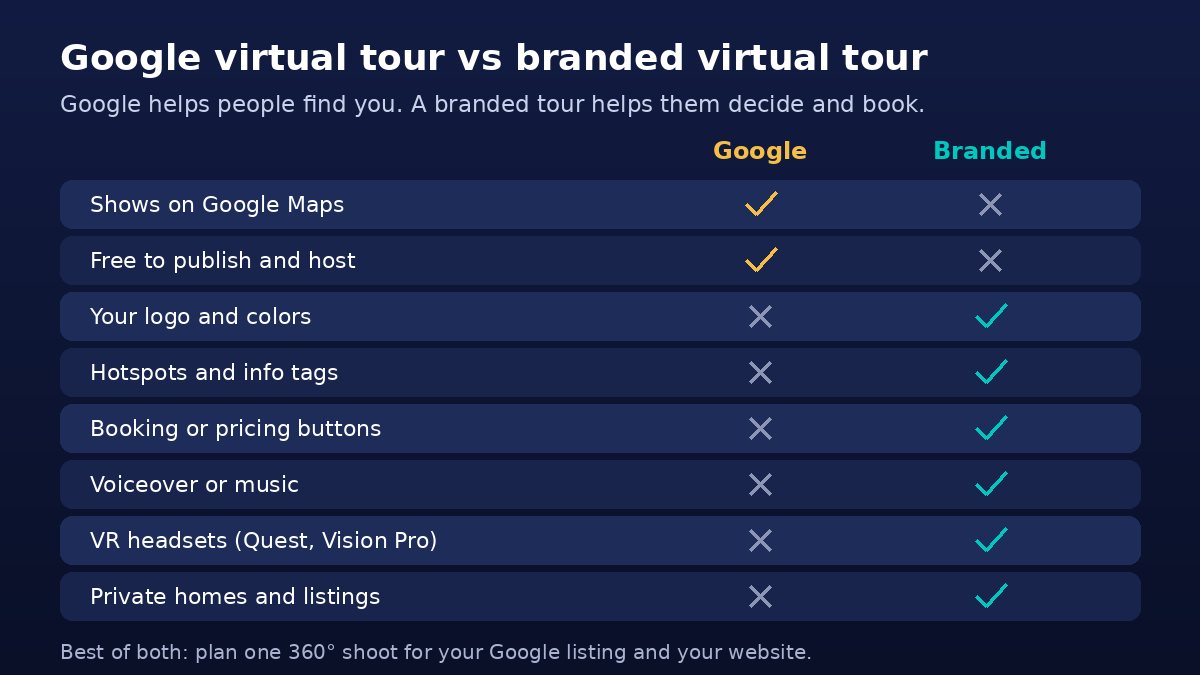
That means a Google tour usually can’t give you:
- Branding: your logo, colors and custom interface
- Hotspots and info tags: clickable notes on features, menus, capacity or specs
- Calls to action: “Book a tour,” “Get pricing” or “Check dates” buttons inside the experience
- Voiceover or music: a guided walkthrough in your own voice
- VR headset viewing: a tour visitors can explore in a Meta Quest or Apple Vision Pro at a trade show, open house or sales meeting
- Control over placement: Google decides how and where imagery shows on Maps
Should you get a Google tour, a branded tour or both?
For most businesses that sell an in-person experience, the answer is both. The Google tour helps people find you; the branded tour on your website helps them decide and book.
| Google virtual tour | Branded virtual tour | |
|---|---|---|
| Main job | Discovery on Google Search and Maps | Selling on your website, in emails and at events |
| Where it lives | Your Google Business Profile | Your website, QR codes, social posts, listings and VR headsets |
| Branding and hotspots | No | Yes: logo, colors, info tags, voiceover |
| Calls to action | No | Yes: booking, pricing and contact buttons |
| VR headsets | No | Yes: Meta Quest 2 and 3, Apple Vision Pro |
| Residential homes | Not allowed | Allowed |
| Cost | Free to publish; you pay for capture | From $4,000 with IGIVU |
The smart move is to plan one shoot for both. Ask any provider, including us, whether a Google-ready version of the panoramas is included in the quote. If you are weighing DIY platforms instead, our guide to Matterport alternatives for businesses compares the options.
What does an IGIVU virtual tour include?
IGIVU’s custom virtual tour service covers the full process: professional 360° HDR photography, stitching, branded hotspots, custom design, hosting and deployment to web, mobile and VR headsets.
- Timeline: most tours take 7 to 14 days from photography to delivery; larger multi-facility tours take 2 to 4 weeks.
- Embedding: you can embed the tour on your website within an hour and share it by email, social media, QR codes, online ads and listings.
- Updates: if you renovate or add rooms, the affected scenes can be updated without rebuilding the whole tour.
- Events: the Professional Tour includes four ready-to-use Meta Quest 3 headsets and a day of on-site support, so your tour can run at a booth or open house. Need more headsets? See VR headset rentals.
If you also want 3D models or custom VR content inside the tour, our AR/VR content creation team can build them.
Frequently asked questions
Is a Google virtual tour free?
Publishing a tour to Google Maps is free, and Google hosts it at no charge. You pay only for capture: a 360° camera and your time if you do it yourself, or a photographer’s fee if you hire help.
How do I add a 360 tour to my Google Business Profile?
Capture 360° photos that meet Google’s specs (at least 3,840 x 1,920 px, 2:1 ratio, under 75 MB), then upload them to your location through Google Maps or a third-party publishing tool that links them into a tour. Allow up to 4 days for processing.
Do I need a Google Trusted Photographer?
No. Google retired the Street View trusted program and its badge on December 31, 2024. Anyone can publish 360° imagery to Google Maps, so choose a provider based on portfolio, reviews and the quality of tours you can walk through yourself.
Can I publish a Matterport tour to Google Street View?
Yes. Matterport offers a Google Street View add-on that publishes your visible 3D scans to your Google listing, free with any plan. Google’s terms don’t allow residential homes, so this works for businesses, not private listings.
How long does it take to get a virtual tour on Google Maps?
A small space can be captured in a few hours, and Google says to allow up to 4 days for linked tours to process after publishing. A custom branded tour from IGIVU typically takes 7 to 14 days.
Can a Google virtual tour include my logo or booking button?
Not really. Google asks for imagery that represents reality without significant alterations, so tours on Maps don’t support custom branding, hotspots or calls to action. For those, use a branded tour on your own website.
Ready to put your space on Google and on your website?
IGIVU builds branded 360° virtual tours for venues, hotels, showrooms, campuses and facilities nationwide, and has served more than 3,000 organizations. Tell us about your space and what you want the tour to do, and you’ll get a quote in under 24 hours. Request your virtual tour quote or email [email protected].