If you are already comparing vendors and weighing costs, you do not need a primer on what a virtual tour is. What you need is a clear-eyed breakdown of what separates a branded virtual tour from a generic one, what it will actually cost your business, how the production and deployment process works, and what questions to ask before you sign anything. That is exactly what this guide covers.
What Makes a Virtual Tour ‘Branded’ and Why It Matters for Business Buyers
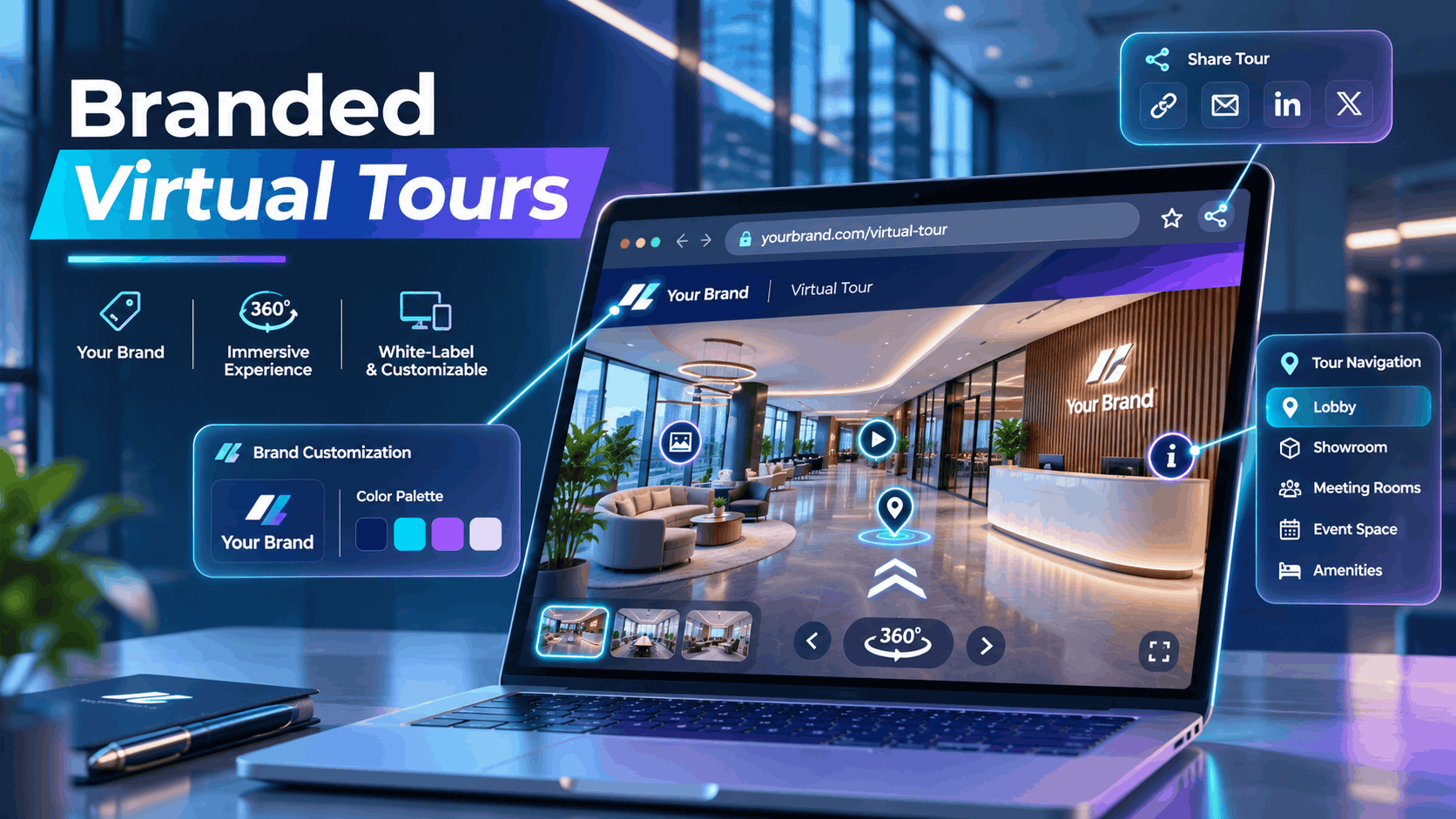
A branded virtual tour is not a 360-degree walkthrough with your logo dropped in the corner. It is a fully customized immersive experience where your visual identity — colors, typography, interface elements, domain, and narrative structure is built into the tour itself, not layered on top of a generic platform template.
For businesses using virtual tours in sales, real estate, hospitality, retail, or corporate communications, the difference between a branded and an unbranded tour is the difference between a tool that reinforces your credibility and one that quietly signals you are using someone else’s software.
Branded vs. Generic Virtual Tours: The Actual Differences
Most virtual tours produced today live on a vendor’s platform with the vendor’s interface chrome, the vendor’s watermark, and a URL that reads something like platform.com/yourspace/abc123. That is a generic tour. It may look polished, but it is not yours.
Here is how a branded virtual tour differs at every layer:
| Element | Generic Tour | Branded Tour |
|---|---|---|
| URL | vendor.com/yourtour |
yourbrand.com/tour or tours.yourbrand.com |
| Loading screen | Platform logo and colors | Your logo, your colors |
| Interface chrome | Platform default skin | Custom skin matched to your brand standards |
| Watermarks | Vendor watermark visible | No third-party branding visible |
| Share links | Vendor URL in preview | Your domain in OG preview image and share card |
| Navigation icons | Platform defaults | Custom icons matching your visual language |
| Hotspot styling | Platform template | Branded hotspot design with your typography |
White-label hosting is the term vendors use when the platform is invisible to the end user. But “white-labeled” means different things to different vendors. Some remove the logo but leave the vendor URL intact. Others strip everything — the URL, the loading screen, the browser tab title, and the share link preview. Before you accept a quote that includes “white-label hosting,” confirm exactly which elements are covered.
Custom navigation labels, hotspot icons, and intro screens are where the difference becomes tangible for end users. A tour that opens with your brand’s intro animation, navigates through spaces labeled in your brand voice, and surfaces hotspots styled to your design system feels owned. A tour that opens with a spinning platform logo and uses default blue hotspot bubbles feels rented — because it is.
Why this matters for sales and marketing use cases: a prospect who clicks a link in your proposal and lands on a tour that looks like a SaaS product demo is not experiencing your brand. They are experiencing your vendor’s brand. In high-value sales processes, that gap is not trivial.
Common Business Use Cases for Branded Virtual Tours
Branded virtual tours are not a single-use tool. The use cases below represent where the branding investment delivers the clearest return:
- Commercial real estate and property marketing: Office buildings, retail spaces, and hospitality venues where the landlord or developer’s identity needs to lead. A generic tour on a listing platform is table stakes; a branded tour on your own domain is a differentiator.
- Corporate facility tours for HR and onboarding: New hires touring a branded version of headquarters before their first day, with company messaging, team introductions, and wayfinding embedded in hotspots. The tour becomes an extension of your employer brand.
- Retail and showroom experiences: Branded product environment tours embedded in sales decks and on e-commerce pages. The tour sells the environment, not just the product.
- Event venue marketing: Hotels, conference centers, and event spaces using branded tours as a primary sales tool for event planners who cannot visit in person. The tour needs to feel like the venue’s brand, not a third-party platform.
- Trade show and activation follow-up: Sending a branded virtual tour to leads after a live event to extend the experience digitally. A generic tour link in a follow-up email is forgettable; a branded one reinforces the identity you built at the event.
- Multi-location businesses: Franchise or chain operators who need a consistent branded tour template deployed across dozens of locations. Brand consistency at scale is the entire value proposition here.
What a Branded Virtual Tour Actually Costs
Pricing for branded virtual tours varies significantly depending on whether you need a one-time asset or an ongoing managed experience, how many locations are involved, and how deeply the branding is integrated into the platform rather than just the content. The ranges below reflect real-world project scopes — not entry-level DIY tools and not bespoke enterprise builds at the extreme high end.
One-Time Production Cost vs. Ongoing Hosting Fees
Branded virtual tour pricing has two distinct components that are often bundled in vendor quotes but should be understood separately:
Production cost is the fee to capture, process, and build the tour — typically $500 to $5,000+ depending on property size, number of scan points, and the depth of custom interface work required. This is a one-time fee per project.
Hosting fee is the annual or monthly cost to keep the tour live, accessible, and embedded on your domain — typically $200 to $1,200 per year per tour depending on the platform and the level of white-labeling included. This is a recurring cost that continues for as long as the tour is live.
Several cost variables that are frequently missed in initial quotes:
- What happens if you stop paying hosting: Some platforms take the tour offline immediately. Others offer a grace period. Very few allow you to export a self-hosted static version. Ask this question before you commit to a platform, not after.
- White-label platform fees: Many vendors charge a separate fee to remove their branding from the interface. This is often not included in the base production quote. Confirm whether white-labeling is included or an add-on before comparing quotes.
- Custom domain embedding: Whether the tour URL is
yourbrand.com/tourorvendor.com/yourtouris not just an aesthetic preference — it affects SEO, trust signals, and brand consistency. Configuring a custom domain or CNAME subdomain may be included in the production fee or quoted separately.
What Drives Cost Up: The Variables That Matter
Understanding what pushes a project toward the higher end of the range helps you scope accurately and avoid surprises:
- Number of scan points or rooms: More capture points mean a longer shoot, larger file sizes, and more processing time. A 2,000 sq ft showroom and a 20,000 sq ft office building are not priced the same.
- Custom interface design: If you need a bespoke skin rather than a platform template — custom fonts, unique navigation patterns, brand-specific animations — expect design and development time to be quoted separately. This can add $500 to $2,000+ to a project.
- Hotspot content: Embedded videos, PDFs, contact forms, product links, and interactive overlays inside the tour each add production time. A tour with 20 rich hotspots takes significantly longer to build than one with 5 basic information points.
- Multi-location deployments: A single branded template deployed across 10 or 50 locations is priced differently than 10 individual projects. Ask whether the vendor uses a master template approach — it should reduce per-location cost substantially.
- Integration requirements: Embedding the tour in a CRM, a property listing platform, or a custom website with specific technical constraints adds scope. API integrations and custom embed configurations are not always included in base quotes.
- Turnaround time: Rush production for a trade show or product launch typically carries a 20–30% premium. Build your timeline with enough lead time to avoid this cost.
Pricing Benchmarks by Use Case
These benchmarks reflect all-in costs for year one, including production and hosting, for typical project scopes:
| Use Case | Year-One Cost Range |
|---|---|
| Single commercial property, basic branding | $800 – $2,500 |
| Corporate facility tour with custom interface, hotspots, HR content | $2,000 – $6,000 |
| Multi-location branded template (5–20 locations) | $3,000 – $15,000+ |
| Ongoing hosting per tour (year two and beyond) | $100 – $300 per tour per year |
A note on DIY platforms: Tools like Matterport and Kuula have lower entry-level production costs but limited white-label options on their standard tiers. If brand control matters, verify white-label availability before choosing a platform — upgrading later often means migrating your entire tour library.
How Branded Virtual Tours Are Built: The Production Process
Understanding the production workflow helps you brief a vendor accurately, set realistic timelines, and avoid the most common mistakes — like discovering after delivery that the tour is hosted on the vendor’s domain or that your brand colors were approximated rather than matched to your actual hex codes.
Step 1: Capture — What Happens On-Site
The physical space is captured using 3D scanning equipment — Matterport Pro cameras, Leica BLK360, or similar devices — in overlapping scan points that the software stitches into a navigable 3D model.
Typical shoot time: 1 to 4 hours for a single commercial space, depending on size, layout complexity, and the number of scan points required. Larger spaces with complex geometry take longer; open-plan spaces with clear sightlines move faster.
What the vendor needs from you before the shoot:
- Floor plan or rough layout of the space
- Access schedule and any security or escort requirements
- Staging requirements — furniture, signage, and props should be in final position before capture
- A list of any areas to exclude from the tour (server rooms, private offices, restricted zones)
Privacy considerations: If the space contains employee workstations with visible screens, confidential documents, whiteboards with sensitive information, or identifiable individuals, flag these before capture. Removing or blurring elements after processing is possible but adds time and cost. It is significantly easier to manage before the shoot.
Step 2: Processing and Platform Build
Raw scan data is processed into a navigable 3D model — this typically takes 24 to 72 hours after the shoot, depending on the platform and the size of the dataset.
Once the base model is processed, the tour is built on a platform — Matterport, Kuula, Roundme, or a custom WebGL environment — and the branding layer is applied. This is where the difference between a generic tour and a branded one is actually constructed:
- Interface color scheme matched to your brand hex codes
- Logo placement on loading screen, navigation bar, and share cards
- Custom navigation icons and hotspot styling
- Intro screen or splash screen with brand messaging
- White-label hosting configuration, including CNAME setup if the tour is served from your domain
Review and revision cycle: Plan for at least one round of structured feedback before the tour goes live. Changes to hotspot content — text, links, embedded media — are straightforward to make after build. Changes to the interface skin, navigation structure, or branding application after the build is complete are more time-consuming and may be quoted as change orders. Front-load your feedback on branding and structure; leave content edits for the review round.
Step 3: Deployment and Embedding
A branded virtual tour can be deployed through several channels simultaneously:
- iframe embed on your website or landing page — the most common deployment for customer-facing tours
- Direct URL for sharing in emails, proposals, and social media
- QR code for print materials, signage, trade show displays, and physical spaces
- API integration for CRM platforms, property listing systems, or custom web applications
Domain configuration: If the tour is served from your domain, your web team or the vendor will configure a CNAME DNS record pointing your subdomain (e.g., tours.yourbrand.com) to the hosting platform. This is a straightforward technical task — typically 15 minutes of work — but it requires DNS access. Confirm who handles this in the project scope.
Analytics: Before launch, confirm what data the platform provides and who can access it. At minimum, you should expect view counts, session duration, and hotspot interaction data. Some platforms provide this directly in a dashboard accessible to you; others require you to request reports from the vendor. If analytics are important to your use case, verify access before you sign.
Mobile and tablet performance: Branded tours must be tested on iOS and Android before launch. Custom interface elements — particularly custom fonts, animations, and non-standard navigation patterns — do not always render correctly on mobile without additional optimization. Build mobile testing into the delivery checklist, not as an afterthought.
How to Choose a Branded Virtual Tour Vendor: The Questions That Actually Matter
Most vendor comparisons focus on image quality and platform features. The questions that actually protect your investment are about ownership, hosting continuity, and how deeply the branding is applied — not just whether the tour looks good in a demo.
Ownership and Portability
Who owns the scan data and the processed 3D model? This is the most important question you will ask. If the vendor owns the underlying data, you cannot take it to a competing platform, use it for other purposes, or protect yourself if the vendor raises prices or shuts down. Ownership of the raw files — E57, OBJ, or the platform’s native format — should be explicitly stated in your contract.
Can you export the raw files if you end the relationship? For any multi-year or multi-location commitment, this is non-negotiable. A vendor who cannot or will not commit to file portability is a vendor who is building lock-in into the relationship.
What happens to the live tour if you stop paying the hosting fee? Ask specifically: does the tour go dark immediately? Is there a grace period? Can you download a static version or export an offline copy? The answers tell you how much leverage the vendor retains over your published asset.
Branding Depth: What to Verify Before You Sign
Ask to see a live example of a white-labeled tour — not a screenshot, a live URL. Open the page source and check for vendor branding in the URL structure, the browser tab title, the meta tags, and the share link. If you share the tour URL on LinkedIn or in an email, what preview image and title does it generate? That OG image and title should carry your brand, not the vendor’s.
Confirm that every branded touchpoint is covered:
- Loading screen
- Browser tab title and favicon
- Share preview image (OG image)
- Mobile experience, if the tour opens in a mobile browser or app
- Any email notifications or analytics reports sent to end users
Ask whether brand colors are matched to your exact hex codes or approximated to the platform’s available palette. Some platforms have limited color customization at the CSS level; others allow full custom styling. If your brand uses a specific Pantone or hex value, verify it can be matched exactly.
If you have brand guidelines, send them before the quote. Vendors who ask for them before scoping the project are more likely to apply them correctly than vendors who ask for them after you have signed.
Scalability for Multi-Location Businesses
If you are a franchise operator, a chain retailer, or any business that needs tours across multiple locations, the vendor’s approach to scale matters as much as their approach to a single project.
- Ask whether the vendor uses a master template that can be cloned and customized per location. A template-based approach should reduce per-location cost significantly compared to building each tour from scratch.
- Confirm the hosting fee structure for a tour library: Is it priced per tour, per gigabyte of storage, or as a flat fee for unlimited tours under one account? The difference between these models becomes significant at 20 or 50 locations.
- Ask about turnaround time for adding a new location to an existing branded template. For franchise or chain operators, this should be measured in days, not weeks. A vendor who quotes you four to six weeks per location is not set up for scale.
- Check whether the vendor has actual multi-location experience or is quoting you a single-location workflow at scale. Ask for references from multi-location clients and ask those clients specifically about consistency, turnaround time, and cost per location.
Branded Virtual Tours vs. Standard Virtual Tours: When the Upgrade Is Worth It
Not every business needs a fully branded virtual tour. A generic tour is faster to produce and cheaper to host, and for some use cases the branding layer adds cost without adding proportional value. Here is a clear framework for deciding.
When Branding Is Worth the Premium
- Customer-facing use cases where the tour is embedded on your website, shared in sales emails, or displayed at trade shows. Anywhere a prospect will see it, the brand experience matters and the investment is justified.
- Long-lived assets that will be used for 12 months or more. The branding investment amortizes over time — a tour that costs $3,000 to produce and runs for three years costs you $1,000 per year before you factor in the leads or conversions it drives.
- Multi-location businesses where brand consistency across locations is a competitive differentiator. A customer who visits your Chicago location and your Austin location should have the same branded tour experience.
- High-value sales processes where the tour is part of a proposal or pitch. A branded tour signals investment and professionalism in a way a generic one does not. In a competitive proposal, that signal matters.
When a Standard Tour Is Sufficient
- Internal documentation: Construction progress, facility audits, insurance records, or space planning references where no external audience will see the tour. Brand experience is irrelevant here.
- Short-lived projects: A pop-up event, a temporary installation, or a seasonal activation where the tour will be used for a few weeks and then archived. The branding investment does not have time to amortize.
- Budget-constrained pilots: If you are testing whether virtual tours drive results before committing to a branded rollout, a standard tour at lower cost is a reasonable first step — provided the platform you choose supports white-labeling when you are ready to upgrade.
Important: Starting with a standard tour on a platform that does not support white-labeling may lock you into a migration later. Before you choose a platform for a pilot, ask about the upgrade path to a branded experience. Migration costs can exceed the savings from starting cheap.
Getting a Quote for a Branded Virtual Tour: What to Prepare
A well-prepared brief gets you a faster, more accurate quote — and surfaces vendor capability gaps before you are committed. Vendors who respond to a detailed brief with vague pricing are telling you something important about how they manage projects.
Information to Include in Your Brief
Property or space details:
- Square footage and number of rooms or distinct areas to be captured
- Any access restrictions, security requirements, or scheduling constraints
- Whether the space will be staged or captured as-is
Branding requirements:
- Your brand guidelines document
- Hex codes for primary and secondary brand colors
- Logo files in vector format (SVG or AI preferred)
- Any specific interface preferences — navigation style, hotspot behavior, intro screen requirements
- Examples of branded digital experiences you want the tour to feel consistent with
Hosting requirements:
- Whether you need the tour served from your own domain or subdomain
- Whether you have DNS access or need the vendor to manage domain configuration
- Whether you need the tour integrated with any existing platforms (CRM, listing platform, website CMS)
Intended use:
- Where the tour will be embedded or shared (website, email, trade show display, sales deck)
- Who the audience is — prospects, new hires, event planners, retail customers
- This context affects how the vendor scopes the interface, hotspot content, and mobile optimization
Timeline:
- When you need the tour live
- Whether there is a hard deadline tied to a launch, event, or campaign
- Whether rush production is acceptable at a premium or whether the timeline is flexible
Volume:
- Whether this is a single tour or the first of many
- If multi-location, how many locations are in scope now and how many might be added over the next 12 to 24 months
- Vendors will price a multi-location rollout differently than a one-off project, and your leverage on pricing increases with volume
Frequently Asked Questions
What is a branded virtual tour?
A branded virtual tour is a 360-degree or 3D immersive walkthrough of a physical space that is fully customized to reflect a business’s visual identity. This includes custom interface design, brand colors, logo placement, custom domain hosting, and the removal of all third-party platform branding. The result is an experience that looks and feels like it belongs to the business, not to the software vendor that produced it.
How much does a branded virtual tour cost?
Branded virtual tour costs typically range from $800 to $6,000+ for a single location in year one, including production and hosting. The main cost drivers are the size of the space, the depth of custom interface design, the number of hotspots and embedded content elements, and whether white-label hosting is included. Ongoing hosting fees typically run $100 to $300 per tour per year after the first year.
Can I host a virtual tour on my own domain?
Yes. Most professional virtual tour platforms support custom domain hosting via a CNAME DNS record, which allows the tour to be served from a subdomain like tours.yourbrand.com. Some platforms include this in their standard hosting fee; others charge a premium for it. Confirm custom domain support before choosing a platform or vendor.
What is a white-label virtual tour?
A white-label virtual tour is one where all visible references to the platform or vendor that produced it have been removed. This includes the URL, the loading screen, the interface chrome, the browser tab title, and the share link preview. A true white-label tour is indistinguishable from a proprietary tool built by the business that commissioned it. The term is used loosely by some vendors — always verify which elements are actually removed.
How long does it take to produce a branded virtual tour?
A typical branded virtual tour takes one to two weeks from shoot to delivery for a single location. The shoot itself takes one to four hours on-site. Processing takes 24 to 72 hours. Building the branded interface, adding hotspot content, and configuring white-label hosting typically takes three to seven business days. Rush timelines are possible but usually carry a premium.
Who owns the virtual tour files after production?
This depends entirely on your contract. Some vendors retain ownership of the scan data and the processed 3D model, which means you cannot take the files to another platform. Others transfer full ownership to the client. Before signing any agreement, confirm in writing that you own the raw scan files (E57, OBJ, or the platform’s native format) and that you can export them if you end the relationship.
Can I use a branded virtual tour for multiple locations?
Yes, and multi-location deployment is one of the strongest use cases for branded virtual tours. A well-structured vendor will build a master branded template that can be cloned and customized for each location, significantly reducing per-location cost. Confirm that the vendor has experience with multi-location deployments and ask about the hosting fee structure for a tour library before committing.
What is the difference between a branded virtual tour and a Matterport tour?
Matterport is a platform used to capture and host virtual tours. A Matterport tour on a standard plan is hosted on Matterport’s domain, carries Matterport’s interface, and is not white-labeled. A branded virtual tour may be built using Matterport’s capture technology but hosted on a white-label platform or a custom WebGL environment where Matterport’s branding is not visible. Matterport does offer white-label options on higher-tier plans, but these are priced accordingly and have limitations compared to purpose-built white-label platforms.
Do branded virtual tours work on mobile?
Yes, but mobile performance requires explicit testing and optimization. Custom interface elements non-standard fonts, animations, and navigation patterns — do not always render correctly on iOS and Android without additional development work. Before accepting delivery of a branded tour, test it on at least one iOS device and one Android device and confirm that the branding, navigation, and hotspot interactions all function as intended.
How do I embed a branded virtual tour on my website?
Branded virtual tours are typically embedded using an iframe code snippet provided by the vendor. You paste the snippet into your website’s HTML where you want the tour to appear. If the tour is hosted on your own domain via a CNAME configuration, the embed URL will reflect your domain rather than the vendor’s. For CMS platforms like WordPress, Webflow, or Squarespace, most support iframe embeds natively. If you need the tour integrated with a specific platform or CRM, confirm API or embed support with your vendor before production begins.
Conclusion: The Brand Experience Is the Product
A virtual tour that looks like a SaaS demo is not a brand asset it is a vendor advertisement you are paying for. For businesses using virtual tours in customer-facing sales, marketing, and communications, the branding layer is not optional polish. It is the difference between a tool that builds your credibility and one that quietly undermines it.
The good news is that a fully branded virtual tour custom interface, white-label hosting, your domain, your colors, your experience is achievable at a reasonable cost for most business use cases. The key is knowing what to ask for, what to verify before you sign, and what variables actually drive cost so you can scope accurately and compare vendors on equal terms.
Ready to get a quote? Use the brief framework in the final section of this guide to prepare your requirements, and ask every vendor you contact to show you a live white-labeled example not a screenshot before you commit. The vendors who can do that without hesitation are the ones worth talking to.