Black Friday is this week, and the returns will follow. Retailers expect 19% of this year’s holiday sales to come back, according to Happy Returns’ Returns Happen 2026 report. A lot of those returns start with the same problem: the shopper couldn’t tell how the product would look on them or in their home. Virtual try-on is built to answer that question before checkout. Here’s how it works, what it suits, what it costs and how to roll it out.
Quick answer: Virtual try-on lets shoppers see a product on their face, body or in their room through a phone camera or an uploaded photo before they buy. It works best for eyewear, jewelry, watches, makeup, shoes and furniture. A browser-based (WebAR) try-on for one product line can start around $2,000 with IGIVU, with no app download for shoppers.
What is virtual try-on?
Virtual try-on is a shopping feature that shows a product on the shopper, or in the shopper’s space, instead of on a model. It turns “I think this will look good” into “I can see that it does.”
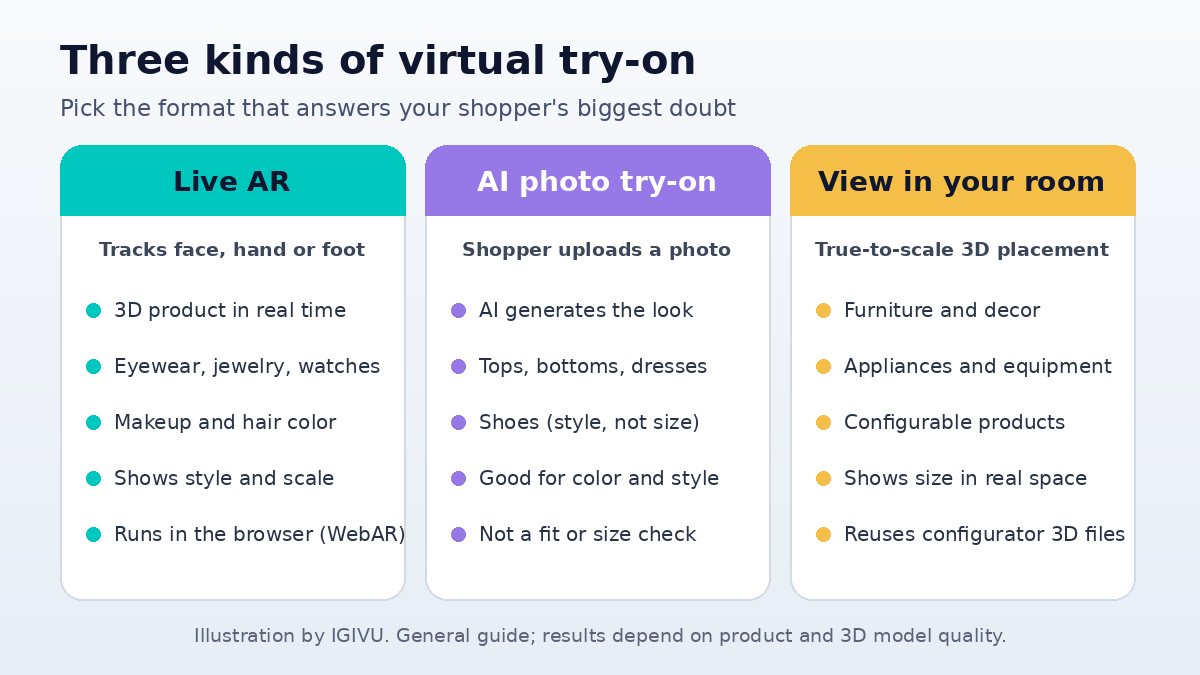
There are three main kinds, and they solve slightly different problems:
- Live AR try-on. The phone camera tracks the face, wrist, hand or foot, and a 3D model of the product sits on it in real time. Shoppers can turn their head and compare frames, shades or styles. This is the classic eyewear, makeup and watch experience.
- AI photo try-on. The shopper uploads a photo, and an AI model generates an image of them wearing the item. Google’s Try-on tool works this way for tops, bottoms, dresses and shoes, and Google notes it does not indicate fit or suggest a size.
- View in your room. The shopper places a true-to-scale 3D model of a sofa, lamp, appliance or machine in their own space. It’s built from the same 3D assets.
How does virtual try-on work?
Every try-on starts with a digital version of the product, usually a 3D model, and software that lines it up with the shopper’s camera view or photo. The quality of the result depends mostly on the quality of that model.
- Build the 3D model. The product is modeled from photos, specs or CAD files, with accurate size, materials and finishes.
- Optimize it for phones. The model is made light enough to load fast on a mobile connection without looking cheap.
- Add tracking. Face, hand, foot or floor tracking anchors the product to the right spot and keeps it there as the shopper moves.
- Deliver it. Shoppers open it from a product page button or a QR code. Browser-based WebAR needs no app. A native app can do more but asks shoppers to install something first. (We compare both in WebAR vs native app.)
- Measure it. Track how many visitors open the try-on, which variants they look at and what happens to conversion and returns.
Which products work best with virtual try-on?
Try-on pays off most when a shopper’s biggest doubt is “how will this look on me or in my space?” It helps far less when the doubt is about fit, feel or performance.
| Product type | Best try-on format | How well it fits |
|---|---|---|
| Eyewear and sunglasses | Live AR (face tracking) | Excellent. Frame shape and size on the face is the main question. |
| Jewelry and watches | Live AR (hand and wrist tracking) | Strong. Shows scale on the hand, which photos hide. |
| Makeup and hair color | Live AR (face tracking) | Strong. Shade matching is hard to judge from a swatch. |
| Shoes and sneakers | Live AR (foot tracking) or AI photo | Good for style. It won’t tell anyone if the size fits. |
| Apparel | AI photo try-on | Good for style and color. Weak for fit and sizing. |
| Furniture, decor and appliances | View in your room | Excellent. Scale and color in the real room is the main question. |
| Configurable products (cars, equipment, custom goods) | 3D configurator with an AR view | Strong. Buyers see their exact options before ordering. |
Does virtual try-on really increase sales and reduce returns?
It can, but the honest answer is “for the right products.” The best evidence says AR helps most when shoppers are unsure about a product, and helps very little when they already know what they’re getting.
A peer-reviewed study of real sales at a cosmetics retailer, published in the Journal of Marketing (Tan, Chandukala and Reddy, 2022), found AR’s overall lift was modest but larger for less popular brands, pricier products and customers new to buying the category online. That’s a useful guide for where to start.
Brand case studies point the same way. Shopify reports that shoppers at Rebecca Minkoff who interacted with a product in AR were 65% more likely to place an order. You’ll also see a “94% conversion lift” quoted everywhere. It comes from a 2022 Shopify changelog about 3D content in general, with no method published, so treat it as a headline rather than a forecast.
The returns side matters just as much. The NRF and Happy Returns estimated that 19.3% of online sales would be returned in 2025, and the 2026 report puts the online return rate at 18%. If even a slice of those returns come from “it looked different online,” better visuals are one of the few fixes that also help sales.
Our advice: test it on a few high-return or high-price products and scale only what moves the numbers.
How much does virtual try-on cost?
Costs depend on how many products you need modeled, how realistic they must look and where the experience runs. Here are IGIVU’s published starting points, all quoted in under 24 hours:
| Option | Starting price | Typical timeline | Best for |
|---|---|---|---|
| WebAR experience (QR or link, no app) | $2,000 per experience | 2 to 3 weeks | Testing try-on or view-in-room on a hero product |
| 3D product configurator, single model | $4,000 per product | 4 to 6 weeks | One product, up to 3 option types, 360° view, web embed |
| 3D configurator, full option set with AR view | $6,000 per product | 4 to 6 weeks | Unlimited options, AR “place in your space,” Shopify or WooCommerce integration |
| Custom AR app (iOS and Android) | $8,000+ | 6 to 12 weeks | Complex interactions or a full branded app |
| AR rental for a pop-up or in-store event | $500 per device; $1,500 per event with a technician | Ships 2 to 3 days early | Curated AR try-ons and 3D product showcases at live events |
Subscription try-on platforms suit large catalogs in one category. A custom build suits a smaller set of hero products, a branded look, or owning your 3D files. Our augmented reality cost guide breaks down the wider price drivers.
How do you add virtual try-on to your online store?
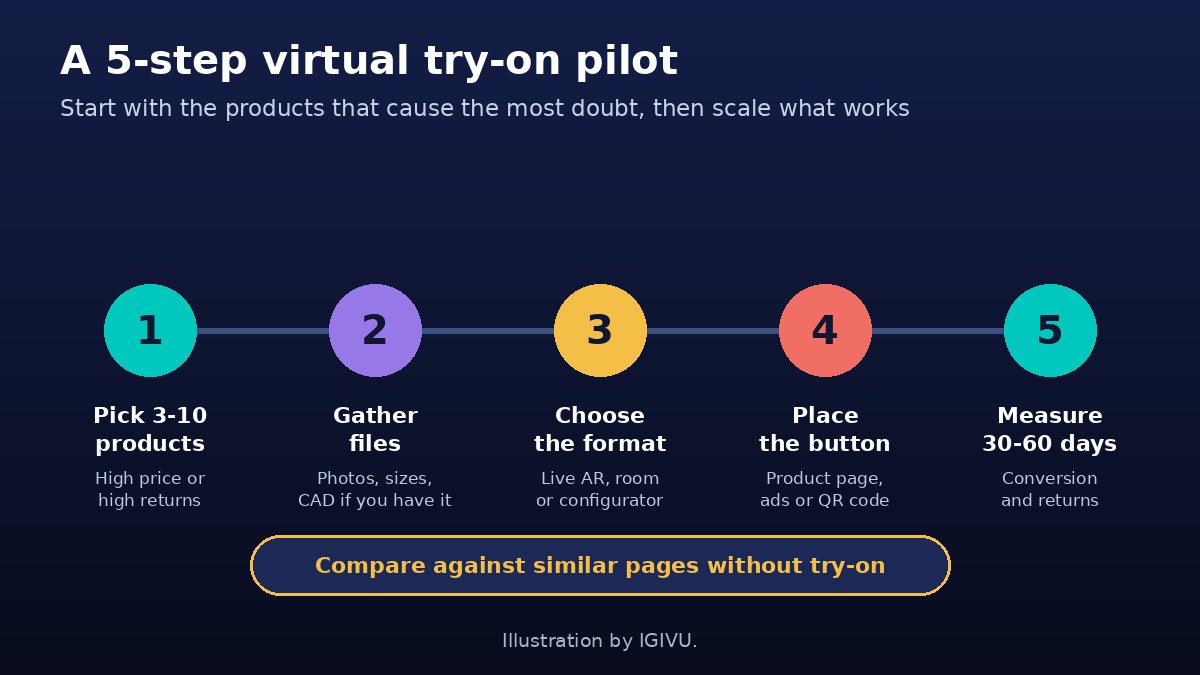
Start small, with the products that cause the most doubt, then expand. A focused pilot is cheaper and gives you cleaner data.
- Pick 3 to 10 products. Choose ones with high prices, high return rates or lots of “how does this look?” questions from customers.
- Gather product files. Photos from several angles, dimensions and any CAD files. You don’t need 3D files to start; IGIVU can build models from specs and photos.
- Choose the format. Live AR for wearables, view-in-room for home and equipment, or a configurator for products with many options.
- Place the button where doubt happens. On the product page near the images, in your ads, or as a QR code on packaging and in-store displays.
- Measure for 30 to 60 days. Compare conversion, average order value and return rate against similar products without try-on.
If you plan to use try-on at pop-ups, trade shows or in stores, the same 3D models can power an event activation. See our virtual fitting room rentals guide for the in-person side.
What mistakes should you avoid with virtual try-on?
Most try-on projects that disappoint were set up to fail by a poor model, a hidden button or an unclear goal. These are easy to avoid.
- Low-quality models. If the product looks fake, shoppers trust it less than a photo. Budget for realistic materials and scale.
- Forcing an app download. Use browser-based WebAR unless you truly need app features.
- Promising fit. Try-on shows style, color and scale. Keep your size charts and say so clearly.
- Hiding the feature. A small icon nobody notices won’t change anything. Label it plainly, such as “Try it on” or “See it in your room.”
- Relying on a platform you don’t control. Hosted AR tools can change or shut down. Keep copies of your 3D files so you can move them, a lesson many brands learned in our 8th Wall alternatives guide.
Frequently asked questions
What is virtual try-on?
Virtual try-on is a shopping feature that shows a product on the shopper’s face or body, or in their room, using a phone camera, an uploaded photo or a 3D model. It helps shoppers judge style, color and scale before they buy.
How accurate is virtual try-on?
Live AR try-on is good at showing style, color and size on the face, wrist or in a room when the 3D model is accurate. AI photo try-on is an approximation. Neither guarantees clothing fit, so keep size charts on the page.
Do shoppers need to download an app for virtual try-on?
No. Browser-based WebAR runs from a product page link or QR code on most modern smartphones with no download. Native apps are only needed for more complex features.
How much does it cost to add virtual try-on to a website?
With IGIVU, a WebAR experience starts at $2,000 and a 3D product configurator with an AR view starts at $4,000 to $6,000 per product. The final price depends on the number of products, realism and integrations. Quotes come back in under 24 hours.
Does virtual try-on work with Shopify?
Yes. Shopify supports 3D models on product pages, and IGIVU’s full-option configurator tier includes Shopify or WooCommerce integration. WebAR experiences can also be linked from any product page.
Can virtual try-on reduce returns?
It can reduce returns caused by “it looked different online,” especially for eyewear, jewelry, makeup and furniture. It won’t fix returns caused by sizing or quality, so measure return rates before and after on a pilot group of products.
Get a virtual try-on quote in under 24 hours
IGIVU is a nationwide XR company headquartered in Dallas that has served 3,000+ organizations. We build WebAR try-ons, 3D product configurators and custom AR experiences, and we rent AR for pop-ups and events. Tell us which products you want shoppers to try, and we’ll send a clear scope and price in under 24 hours. Request your quote or email [email protected].