Travelers can’t smell a lobby or test a mattress online, so they judge your hotel on what they see in a few clicks. A virtual tour lets them walk in before they book, and it does the same job for event planners who are deciding whether your ballroom fits 200 people. Here is how to do it right.
Quick answer: A virtual tour for a hotel is an interactive 360-degree walkthrough of your lobby, rooms, meeting spaces and amenities that guests explore on any phone or browser. It answers the “what will it really look like?” question that photos can’t, and it works best on your room pages, your meetings page and your Google profile.
Why should a hotel have a virtual tour?
Because it removes doubt at the exact moment a guest or planner is deciding. A tour shows scale, light, layout and condition in a way a gallery of cropped photos does not.
- Research backs the effect. A 2024 experiment in the Journal of Hospitality and Tourism Technology found a hotel VR photography preview produced more vivid mental imagery than a picture preview, and that imagery fed into higher booking intention.
- Older, larger data points the same way. In a 2007 study of ten Omni hotels with a blind control group, travelers who viewed rich media (virtual tours and video) were 67% more likely to book than those who didn’t. It is an old study, so treat it as direction, not a promise.
- A recent small case. A 2026 write-up of two boutique hotels in Albania reported direct bookings up 18% and 14% after adding tours to room pages. It is a vendor’s own report on two small properties, so your results will vary.
The honest takeaway: tours help most when the room or space is hard to judge from photos, and when you put them where guests are deciding.
What should a hotel virtual tour include?
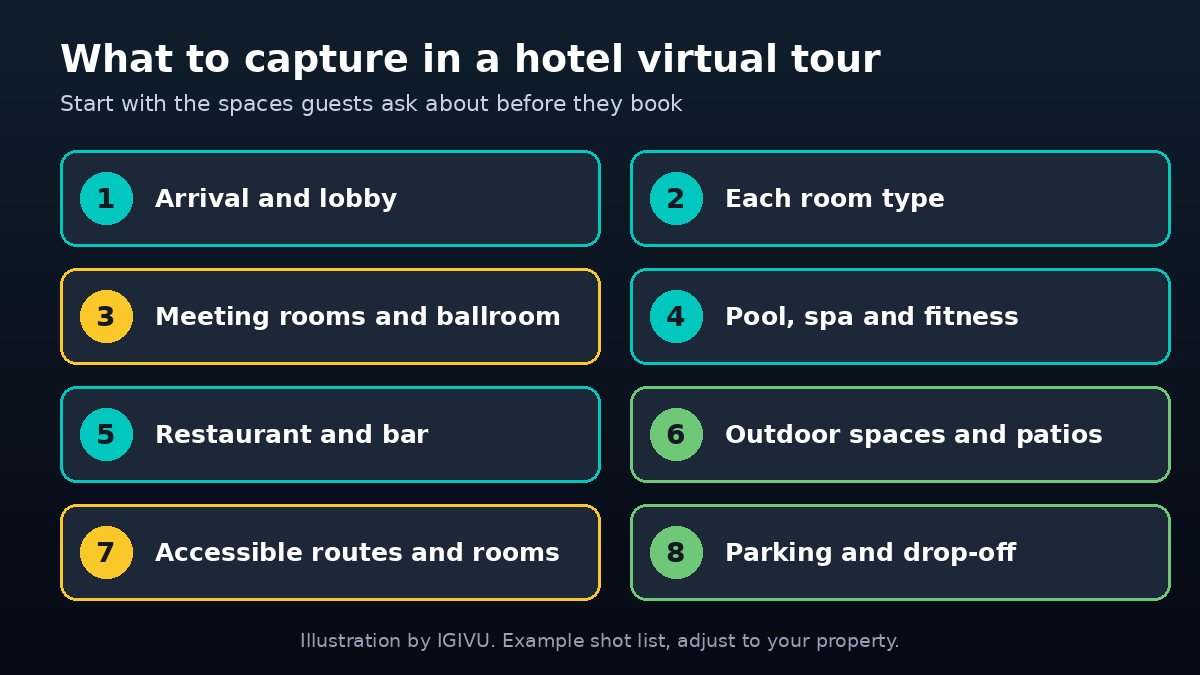
Start with the places guests ask about before they book, then add the rest. Cover every room type you sell, not just your best suite, or guests will feel misled at check-in.
- Arrival and lobby. First impressions, front desk, seating.
- Each room type. One tour point per category, including the bathroom and the view.
- Meeting rooms and ballroom. Capture them empty, then note capacity in the info tags.
- Pool, spa and fitness.
- Restaurant and bar.
- Outdoor spaces. Patios, gardens, terraces.
- Accessible routes and rooms. Guests who need step-free access will thank you.
- Parking and drop-off. It’s a small thing that answers a big question.
How is a hotel virtual tour different from a photo gallery?
A gallery shows what the photographer chose. A tour lets the guest choose where to look. That control builds trust, because nothing is hidden outside the frame.
| Question | Photo gallery | 360 virtual tour |
|---|---|---|
| Shows room size and layout | Partly, angle dependent | Yes, guest explores the full space |
| Works for event planners | Limited | Yes, with capacity and setup tags |
| Works on phone, laptop and VR headset | Phone and laptop | All three |
| Can carry info tags and links | Captions only | Yes, hotspots to rates, menus, booking |
| Update effort | Reshoot photos | Recapture the changed area |
You still want great photos. Keep them for ads, listings and social, and use the tour for the decision moment.
Where should you put a hotel virtual tour?
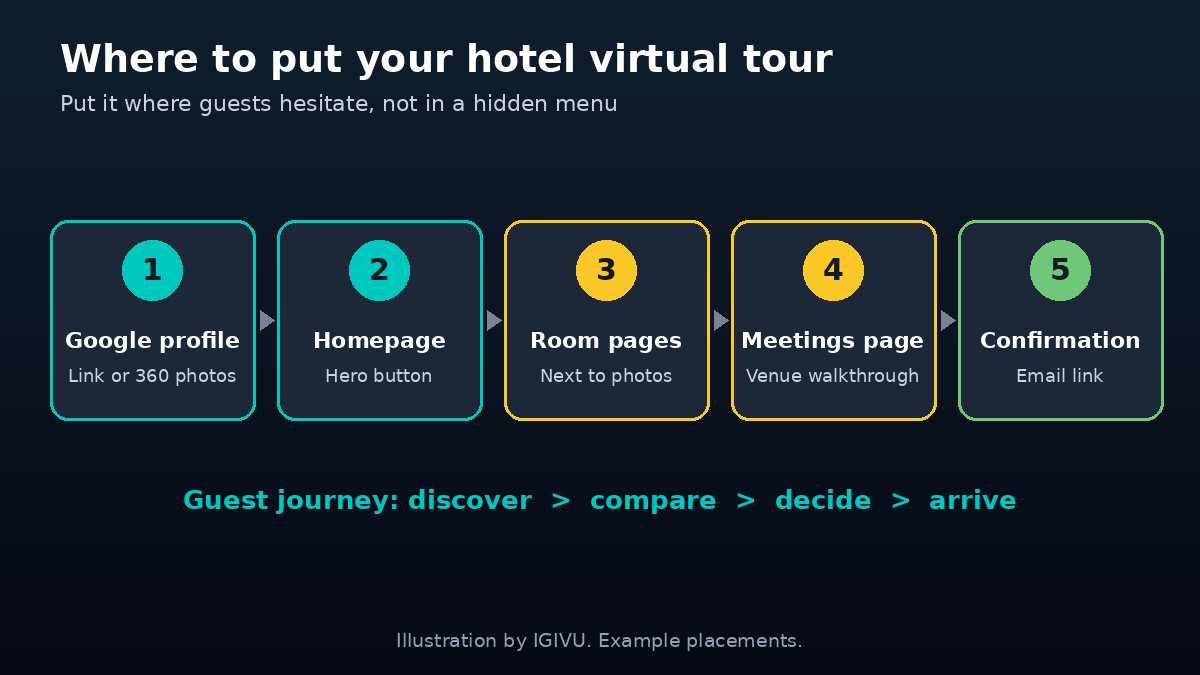
Put it where guests hesitate: the homepage, each room page, your meetings and events page, your confirmation email and your Google profile. A tour buried in a menu gets few clicks.
Can you add a virtual tour to Google Maps?
Yes. Google lets businesses add photos and 360 content to their profile, and a tour link on your website covers the rest. Our Google virtual tour guide walks through the steps and the photo specs.
Should event planners get their own tour?
Yes. Planners shopping for a meeting or wedding space want to see the room empty, then picture their setup. Give the ballroom and breakout rooms their own tour points, with tags for capacity, ceiling height and power. That shortens the back-and-forth before a site visit.
How much does a hotel virtual tour cost?
It depends on how many rooms and spaces you capture, whether you want custom branding and info tags, and where the tour is hosted. A small property is a lighter project than a resort with a ballroom, spa and several room types.
We break down the factors in how much a virtual tour costs. For a hotel quote, tell us your room types, meeting spaces and where you want the tour to live, and we’ll come back in under 24 hours.
How do you get a good tour, step by step?
Plan the shot list, pick the day, capture, build and publish.
- Write the shot list. Use the eight areas above and mark what is a must-have.
- Prep the property. Beds made, lights on, clutter gone, and no guest belongings in frame. Shoot vacant rooms.
- Capture in 360-degree HDR. Bright windows and dark corners need HDR so neither washes out.
- Stitch and add tags. Connect the spaces, then add hotspots for amenities, room details and booking links.
- Publish everywhere. Web, mobile and, if you host events or have a lobby display, VR headsets.
- Refresh after renovations. A tour that shows last year’s carpet costs trust.
What mistakes make a hotel virtual tour fall flat?
Most failures come from placement and upkeep, not the technology. Avoid these.
- Only touring the best room. Guests who book the standard room will feel misled.
- Hiding the tour. If it’s three clicks deep, few people will find it.
- Skipping mobile. Many guests will open it on a phone, so test it there first.
- Letting it go stale. Recapture areas after you renovate.
- No next step. Add a book-now or request-a-quote button inside the tour.
When does a hotel need more than a standard tour?
When you sell events, groups or a brand experience. A branded tour with info tags can double as a sales tool: planners can explore the ballroom, and a VR headset version can be used at a trade show to show a property that is far away. IGIVU builds custom virtual tours across hospitality, real estate and commercial spaces, deployed on web, mobile and VR headsets, and rents the headsets and on-site support for events through our VR event rental service. If a hotel or venue booth needs headsets, see VR headset rental.
FAQ: Virtual tours for hotels
What is a virtual tour for a hotel?
It’s an interactive 360-degree walkthrough of a hotel’s lobby, rooms, meeting spaces and amenities. Guests explore it on a phone, laptop or VR headset, and can move between spaces instead of flipping through photos.
Do virtual tours increase hotel bookings?
Studies and case reports point that way, but results vary. A 2007 Omni study found viewers of rich media were 67% more likely to book, and a 2024 journal study found VR previews improved booking intention versus pictures. Treat the numbers as direction, not a guarantee.
How long does it take to create a hotel virtual tour?
It depends on how many spaces you capture and how custom you want it. The steps are capture, stitching, tagging and review, and we’ll give you a schedule with your quote.
Can a hotel virtual tour work in a VR headset?
Yes. A well-built 360 tour can run on the web, on mobile and in VR headsets. Headsets are handy for trade shows, sales meetings and lobby displays.
What is the difference between a virtual tour and a 360 photo?
A 360 photo is one panorama from one spot. A virtual tour connects many panoramas so guests can move between spaces, and it can carry info tags and links.
Can I add a virtual tour to my hotel’s Google listing?
Yes. You can add photos and 360 content to your Google profile and link the full tour from your website. See our Google virtual tour guide.
Ready to give guests a walk-through before they book?
IGIVU is a nationwide XR company based in Dallas, and 3,000+ organizations have worked with us. Tell us about your property and we’ll send a quote in under 24 hours. Email [email protected] or use our contact page.